Migrating to Kentico Xperience or between Kentico versions can improve performance, editor experience, and long-term maintainability but migrations often fail because teams underestimate content complexity, integrations, or infrastructure changes.
Here are the most common pitfalls and practical ways to avoid them.
One of the biggest mistakes is assuming that all content is already known and structured.
Organizations often discover during migration that they have:
Before migration:
A detailed content inventory prevents late-stage surprises.
Older Kentico implementations often contain years of custom development.
Examples include:
Many of these cannot simply be “lifted and shifted.”
Perform a customization audit early.
Document:
Prioritize rebuilding only what delivers real business value.

Migrating content without a clear mapping strategy creates:
Create a migration mapping matrix that defines:
This becomes the blueprint for automated migration scripts.
A migration can severely damage organic traffic if SEO is neglected.
Common issues:
Prepare an SEO preservation plan:
Use tools like:
Teams sometimes migrate directly into production-like systems without proper staging, rollback plans, or deployment pipelines.
This increases the launch risk dramatically.
Set up:
Implement CI/CD pipelines early.
For modern Kentico implementations, containerization and infrastructure automation can simplify deployments.
Kentico projects frequently integrate with:
During migration, APIs may change or break.
Create an integration dependency map.
Test:
Integration testing should happen before content migration is finalized.
Many migrations focus only on functional correctness.
But after launch, teams discover:
Run:
Helpful tools:
After migration, editors may struggle with:
This creates inconsistent content quality.
Provide:
A technically successful migration can still fail operationally if editors are confused.
Trying to migrate everything at once creates:
Use phased migration strategies where possible:
This reduces operational risk.
Testing is often rushed near go-live.
Critical areas missed:
Create a detailed QA checklist covering:
Recommended references:
Some migrations launch without a fallback option.
If issues occur:
Prepare:
Always define:
Kentico migrations affect:
Only technical success is not enough.
Run migration as a cross-functional program:
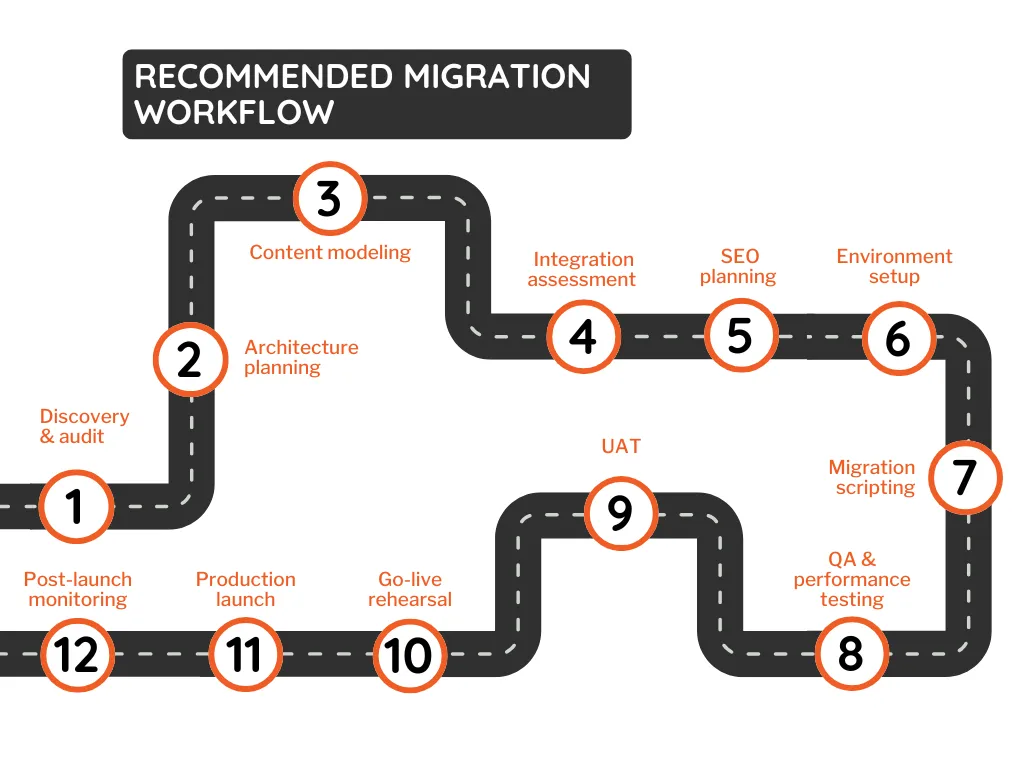
A successful Kentico Xperience migration is less about moving data and more about reducing operational, SEO, and architectural risk.
The most successful projects:
That combination significantly reduces delays, downtime, and post-launch surprises.
Book a free 60-minute assessment with a certified Kentico architect. No obligation.
Talk To Our Expert
A phased migration reduces operational risk, minimizes downtime, simplifies debugging, and allows teams to test and validate sections gradually before full deployment.
Common challenges include incomplete content audits, SEO issues, broken integrations, custom module compatibility, and insufficient testing during migration.
Businesses should preserve existing URLs, create 301 redirects, maintain metadata, rebuild XML sitemaps, and test internal links before launch.

Manthan Jangid is a Senior Software Developer and Kentico Specialist with over 5+ years of experience delivering enterprise CMS and digital experience solutions. As a Kentico Xperience 13 and Xperience by Kentico Certified Professional, he specializes in Kentico upgrades, migrations, and modern digital experience implementations. Through blogs, articles, and community contributions, he actively shares Kentico best practices and real-world implementation insights. He is passionate about helping organizations build scalable and effective solutions with Xperience by Kentico.
Follow on LinkedIn