

_2.png)
Why Businesses Are Moving From On-Premise Servers to Azure
Businesses are moving from on-premise servers to Azure mainly because on-premise infrastructure is expensive to replace on a fixed cycle, hard to scale on short notice, and increasingly out of step with software that assumes cloud availability. Azure replaces upfront hardware spending with usage-based pricing, adds built-in redundancy, and gives IT teams a path to retire aging systems before they reach end of support. The shift shows up clearly in the numbers: Azure now holds close to a quarter of the global cloud market and continues growing at over 30 percent year over year.
In this guide, we will cover:
- The specific problems that make on-premise infrastructure harder to justify every year
- What actually changes when a business moves its servers to Azure
- What the migration process looks like, and where the real trade-offs are
The Problem With Staying On-Premise
Running your own servers used to be the default. It is now a decision that has to be justified against a growing list of costs and risks:
- Hardware reaches the end of its useful life on a predictable schedule, and replacing it is expensive. A single server refresh for a small team, including hardware, installation, and licensing, can run $8,000 to $15,000 before a provider even starts configuration.
- Operating systems and server software eventually stop receiving security updates. Windows Server 2012, for example, reached end of support in October 2023, forcing a decision on every system still running it.
- Scaling for a busy season or a traffic spike means buying capacity that then sits idle the rest of the year.
- Disaster recovery on-premise usually means maintaining a second physical site, which duplicates most of the original cost.
- IT staff spend time patching, monitoring, and maintaining physical infrastructure instead of working on the applications the business actually depends on.
None of these problems are new. What has changed is that the alternative, cloud infrastructure, has matured enough that the cost and effort of staying on-premise is harder to defend than it was five years ago.
The Core Idea: Pay for What You Use, Scale When You Need To
1. Elastic Compute Instead of Fixed Capacity
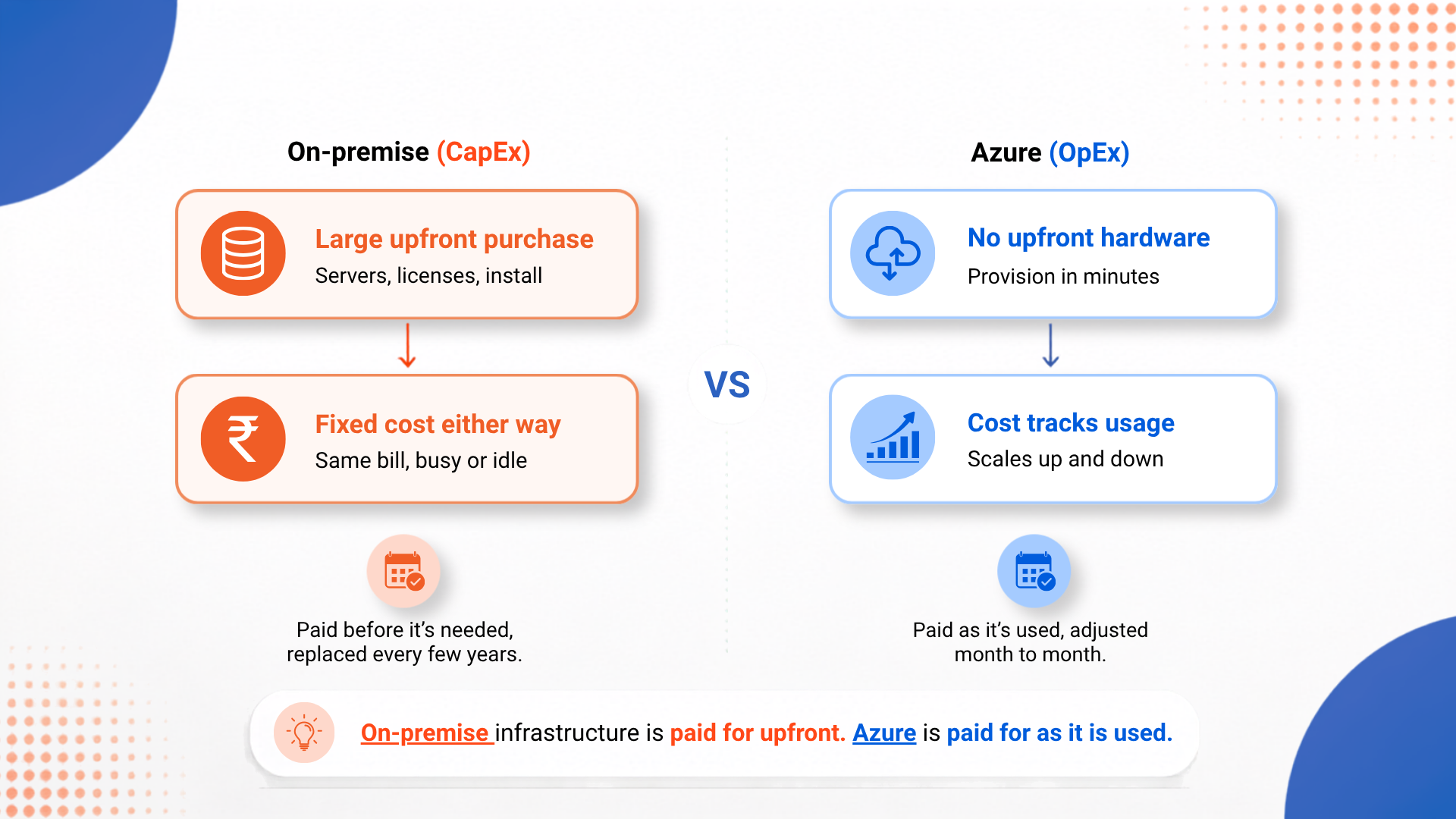
On-premise capacity is fixed the moment hardware is purchased. Azure lets a business provision compute resources in minutes and scale them up or down based on actual demand, so a seasonal spike does not require buying equipment that sits unused the rest of the year.
2. Operating Expense Instead of Capital Expense
Moving from a CapEx-heavy on-premise model to an OpEx-based cloud model changes how infrastructure spending is planned and approved. Businesses following a structured migration strategy often target a 20 to 40 percent reduction in cloud spend compared to unmanaged environments, though that requires ongoing cost management rather than a one-time switch.
3. Built-In Redundancy and Disaster Recovery
Azure Site Recovery handles failover and recovery during planned or unplanned outages by shifting workloads to Azure automatically, removing the need for a business to build and maintain a second physical site purely for backup purposes.
4. Native Integration With Tools Businesses Already Use
For organizations already running Windows Server, SQL Server, or Microsoft 365, Azure integrates directly with those systems, which reduces the amount of custom integration work compared to moving to an unrelated cloud platform. We cover how Azure compares with other providers in more detail in our Azure vs AWS vs Google Cloud comparison.
.png "From-On-Premise-Servers-to-Azure-(internal-a).png")
The On-Premise Journey (Traditional Approach)
Here is what the infrastructure lifecycle typically looks like for a business still running its own servers.
Step 1: A Server Approaches End of Life
Hardware bought four or five years ago is now out of warranty and slower than current alternatives, or the operating system it runs is approaching end of support.
Step 2: Capacity Is Purchased for Peak Demand
To handle the busiest period of the year, the business buys enough hardware to cover that peak, even though it will sit underused most months.
Step 3: A Second Site Is Maintained for Backup
To protect against outages, a duplicate set of infrastructure is kept at a second location, roughly doubling the physical footprint and cost.
Step 4: IT Time Goes to Maintenance, Not Improvement
Patching, monitoring, and physically maintaining servers consumes IT hours that could otherwise go toward improving the applications the business runs on top of that infrastructure.
The Azure Migration Journey
Here is the same set of needs, handled through a structured move to Azure.
.png "From-On-Premise-Servers-to-Azure-(internal-b).png")
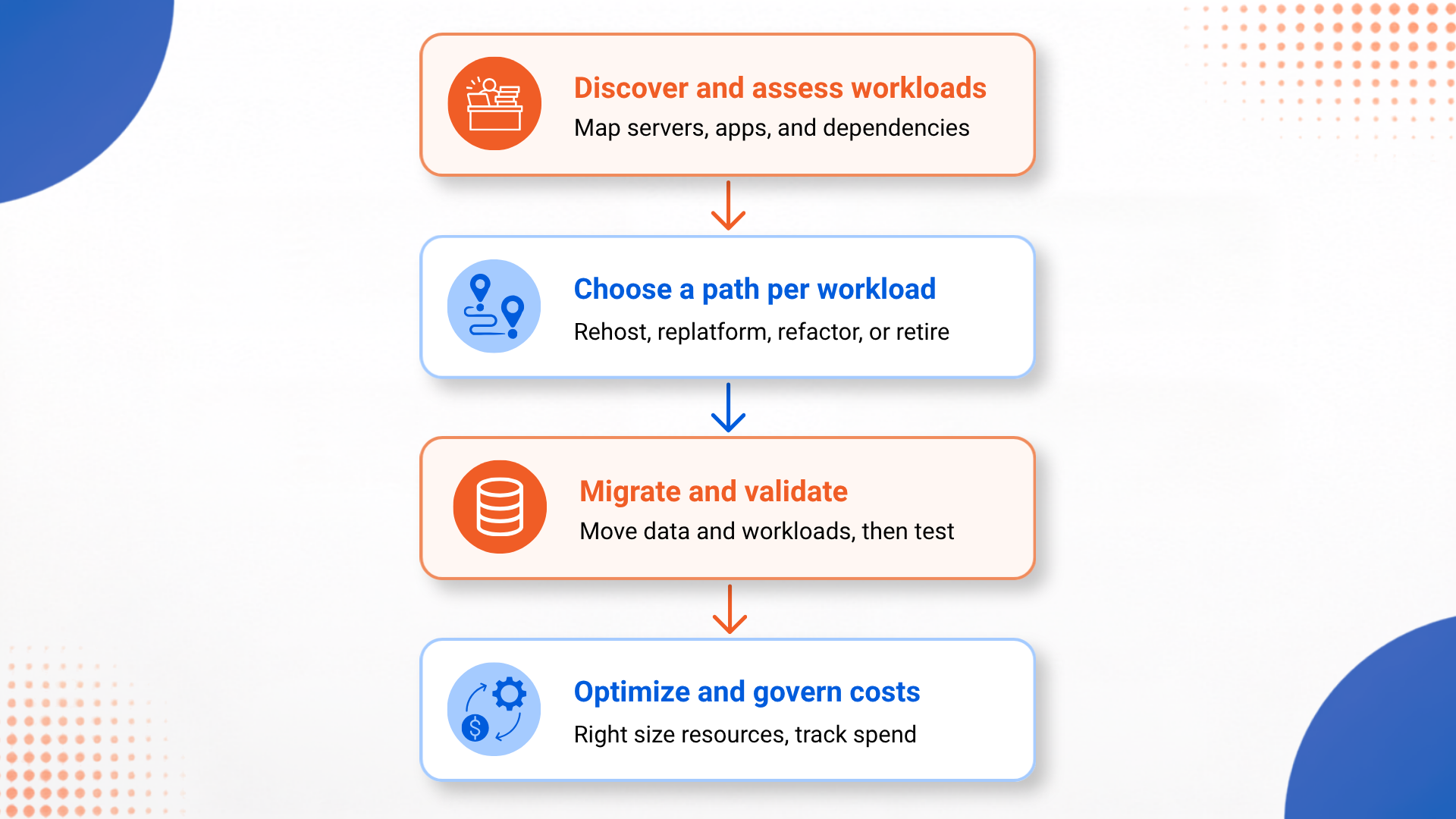
Step 1: Discover and Assess Existing Workloads
Azure Migrate provides a centralized way to evaluate servers, databases, and applications before moving anything, mapping out dependencies so a migration does not accidentally leave a database behind on a slow connection while its application moves to the cloud.
Step 2: Choose a Migration Path for Each Workload
Not every application should move the same way. A simple internal tool might be rehosted as is, while a core business application might be refactored to use cloud native services such as Azure Functions or Azure Kubernetes Service for better long-term scalability.
Step 3: Migrate and Validate
Data and workloads move to Azure in planned phases, with validation at each step to confirm the migrated system performs the way the original did, or better.
Step 4: Optimize and Govern Ongoing Costs
Once workloads are running in Azure, tools such as Microsoft Cost Management help track spend and right size resources, since cloud costs can drift upward if capacity is not adjusted after the initial move.
Implementation Detail: Not Every Workload Should Move the Same Way
Worth calling out specifically: a rigorous assessment during the discovery phase often reveals that 10 to 20 percent of an existing application portfolio is redundant or provides little enough value that it should be retired rather than migrated. Treating migration as an opportunity to retire dead weight, not just relocate it, is one of the more overlooked steps in a successful Azure move.
On-Premise vs Azure
| Aspect | On-Premise Servers | Azure |
|---|---|---|
| Cost structure | Large upfront capital expense | Usage-based operating expense |
| Scaling for demand | Requires buying additional hardware | Provisioned in minutes, scaled on demand |
| Disaster recovery | Requires a second physical site | Built-in failover through Azure Site Recovery |
| Hardware refresh cycle | Every four to five years, at full cost | Handled by the cloud provider |
| End of support risk | Falls entirely on the business to manage | Managed as part of the platform |
| IT staff focus | Significant time on physical maintenance | More time available for applications |
What's Working Well
Faster Response to Demand Changes. Businesses that migrate report being able to scale instantly when opportunity strikes, without the procurement delay that comes with ordering and installing new hardware.
Real Financial Returns Reported. A 2024 IDC report cited a three-year ROI of 704 percent for companies that completed cloud migrations, and most businesses report payback within 12 to 18 months of completing their move.
Costs Track Actual Usage. When revenue dips, infrastructure costs can drop proportionally instead of remaining fixed regardless of how much capacity is actually being used.
A Clear Framework Exists for the Move. The Microsoft Cloud Adoption Framework gives infrastructure teams a structured way to plan the migration rather than approaching it ad hoc, which reduces the risk of costly missteps along the way.
The Honest Trade-Offs
Not Every Application Moves Cleanly. Some applications transfer to Azure with minimal changes, while others need a partial rework or a full rebuild to run well in a cloud environment, and figuring out which is which takes real assessment time upfront.
Costs Can Drift If Left Unmanaged. The pay-as-you-go model only saves money if usage is actively monitored. Provisioning cloud resources at the same fixed size as the old on-premise servers, and then never adjusting them, can erase much of the expected savings.
Refactoring Takes More Time and Budget. Rehosting an application as is can be done in weeks, but refactoring it to use cloud native services properly is a longer, more expensive project, even though it pays off more over time.
Governance Has to Be Set Up Deliberately. Security and compliance controls that were physically enforced by a locked server room now need to be configured directly in Azure, which requires deliberate planning rather than being automatic.
Surprising Decisions Worth Noting
Retirement Is Often Part of the Plan. Migration projects frequently uncover applications that nobody actively uses anymore. Retiring them during the move, instead of migrating everything by default, is a quiet but meaningful source of savings.
Migration Is Often a Multi-Speed Project. Rather than moving everything the same way, mature migrations mix approaches: some systems are rehosted quickly for an early win, while core applications are refactored on a longer timeline. Running both speeds at once is often more effective than picking a single approach for the whole portfolio.
Microsoft 365 Frequently Moves First. For many small and mid-sized businesses, migrating email and file storage to Microsoft 365 happens before any server workloads move to Azure at all, since it delivers a visible improvement with comparatively little technical risk.
The End Result
The move from on-premise servers to Azure is not primarily a technology upgrade. It is a change in how a business pays for and plans its infrastructure, from a large upfront purchase that has to be guessed years in advance, to a flexible model that can be adjusted as needs actually change. The businesses getting the most out of this shift are the ones treating it as a chance to reassess what they run, not just where they run it.
That does not mean migration is free of friction. Some applications will need real rework, and cost discipline has to continue well after the migration is technically finished. But for most businesses still running aging on-premise hardware, the combination of rising replacement costs and a maturing cloud platform has made the case for staying put noticeably weaker each year.
If your organization is weighing this decision, an honest assessment of your current infrastructure, including which applications are actually still needed, is a more useful starting point than picking a migration date first.
Frequently Asked Questions
Why are businesses moving from on-premise servers to Azure?
Businesses are moving from on-premise servers to Azure mainly to avoid recurring hardware refresh costs, to scale capacity up or down without buying new equipment, and to replace aging systems that are reaching end of support without a clear upgrade path.
How much does a typical on-premise to Azure migration cost?
Cost depends heavily on workload complexity. A simple lift and shift of a few servers can take weeks and cost far less than a full modernization project, while replatforming or refactoring applications to use cloud native services can run several months and a larger budget, with many businesses reporting payback within 12 to 18 months.
What is the difference between rehosting and refactoring in an Azure migration?
Rehosting, often called lift and shift, moves an application to Azure with minimal changes, which is faster but does not take advantage of cloud native features. Refactoring modifies the application to use services such as Azure Functions or Azure Kubernetes Service, which takes more effort upfront but delivers better long-term scalability and cost efficiency.
Does moving to Azure always reduce IT costs?
Not automatically. Azure can reduce total cost of ownership when resources are sized correctly and unused capacity is scaled down, but a migration that simply copies existing on-premise sizing to the cloud without adjustment can end up costing more than expected.
How long does it take to migrate from on-premise servers to Azure?
Timelines vary by workload complexity. A straightforward lift and shift migration can take a few weeks, while a modernization project involving application refactoring or a hybrid rollout can run six to twelve months.


.png)
.png)