.webp)
Kentico Search Optimization Using Smart Search
A visitor types three words into your search box and gets nothing useful back, even though the page they wanted is sitting right there in your content tree. That gap between what a site contains and what its search box can actually find is usually a configuration problem, not a content problem, and in Kentico it comes down to how indexing, analyzers, and the underlying search engine are set up.
This post explains what "Smart Search" means in Kentico today, how indexing and relevance actually work under the hood, and how to decide between Kentico's three supported search integrations, Lucene.NET, Algolia, and Azure AI Search, for a modern Xperience by Kentico project.
Here is what this post covers:
- Why site search quietly underperforms even on well-built Kentico sites
- How Smart Search indexing, analyzers, and relevance settings actually work
- The old way of tuning on-site search versus the current integration-based approach
- A direct comparison of Lucene.NET, Algolia, and Azure AI Search
- What to realistically expect from "AI search" in Kentico today
The Problem With Treating Site Search as an Afterthought
- Teams invest heavily in SEO for external search engines, then leave the internal site search box running on default settings.
- Content editors add new pages daily, but no one checks whether those pages are actually being indexed correctly.
- Search relevance gets blamed on "bad content" when the real cause is a missing analyzer, a misconfigured search mode, or an index that was never rebuilt after a content model change.
- Marketing and development teams often don't realize Kentico's search behavior changed significantly between the legacy on-premise platform and Xperience by Kentico, so advice from older documentation does not always apply.
The Core Idea: Search Quality Comes From Configuration, Not Content Volume
1. "Smart Search" Is Legacy Terminology, Not a Current Product Name
Smart Search is the name Kentico used for its built-in Lucene-based search engine in on-premise versions, including Kentico Xperience 13. The configuration options discussed in Kentico's search assistance features documentation, such as search options, field search, and typo tolerance, come from this generation of the product. Xperience by Kentico, the current SaaS platform, does not ship a built-in search engine at all. This distinction matters because a lot of search advice circulating online still describes the older architecture.
2. Indexing Determines What Search Can Ever Find
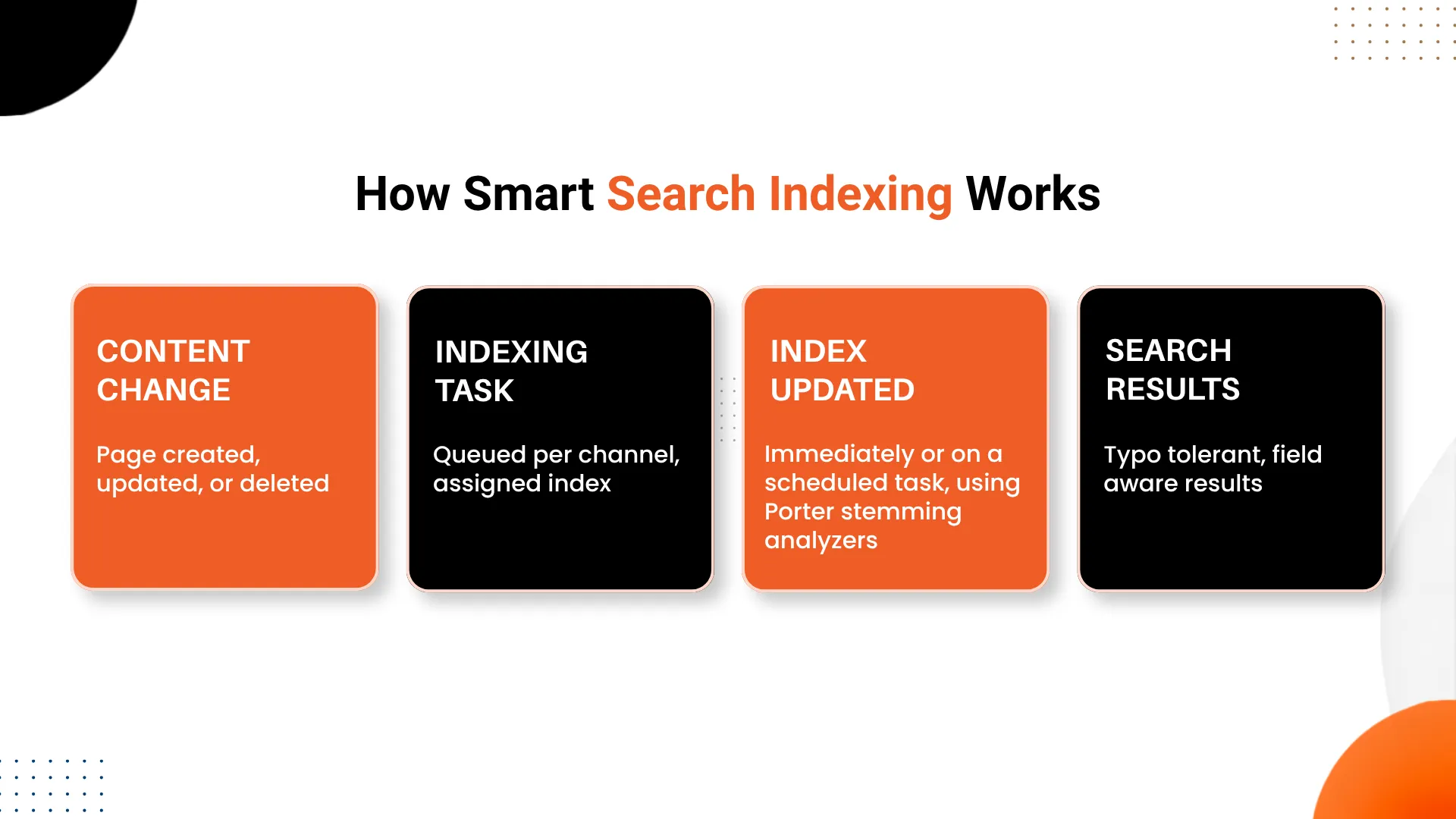
Whether a site runs on the legacy Smart Search engine or one of the current integrations, the underlying mechanic is the same: content changes trigger indexing tasks, and those tasks update a search index either immediately or on a scheduled run. If a page was published before an index existed, or a content type was added after the index configuration was finalized, that content simply will not appear in results until the index is rebuilt. This is one of the most common, and most overlooked, causes of "broken" search.
.webp "Kentico-Search-Optimization-Using-Smart-Search-cta-(1).webp")
3. Search Options Control How Forgiving the Engine Is
In the legacy engine, a Search options setting of None, Basic, or Full determines whether Lucene query syntax and field-specific searching are recognized at all. Field search, in particular, only behaves correctly when the search web part's Search mode is set to Any words. Getting this setting wrong is a frequent reason field-based queries silently fail to return expected results.
4. Analyzers Decide Whether Word Variations Match
Substring search and word stemming are handled by analyzers applied per index, built on the Porter Stemming Algorithm, which reduces words to a common root so that, for example, a search for "running" can also surface content containing "run" or "runs." Typo-tolerant search is a separate, explicit checkbox in the index settings that enables fuzzy matching for near-misspellings. None of this is automatic by default; each behavior has to be deliberately configured.
5. Modern Xperience by Kentico Replaces One Engine With a Choice of Three
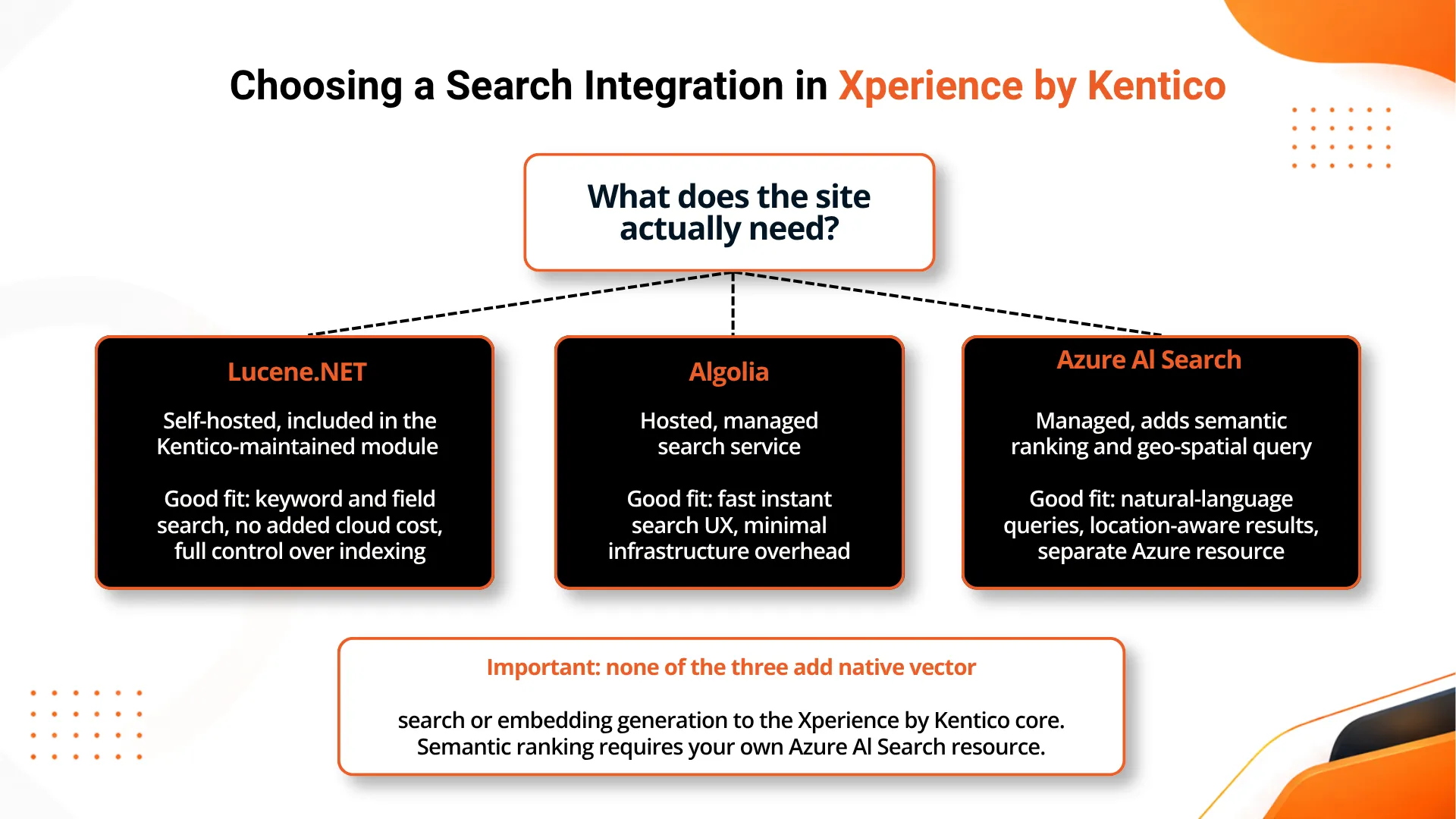
Rather than a single built-in search engine, Xperience by Kentico ships with official, Kentico-maintained integrations for Lucene.NET, Algolia, and Azure AI Search, each distributed as its own module with a dedicated GitHub repository and NuGet package. A project now has to actively choose and configure one of these rather than relying on an engine that comes active out of the box.
The Old Journey: Tuning Search in a Legacy On-Premise Site
Step 1: Configure the Smart Search Index
An administrator defines a search index, picks the content types and fields to include, and sets the Search options level (None, Basic, or Full) that determines how query syntax will be interpreted.
Step 2: Set Field Search and Search Mode
To make field-specific queries work, the search web part's Search mode has to be explicitly set to Any words, since field search does not function correctly under the default mode.
Step 3: Enable Analyzers and Typo Tolerance
Stemming analyzers based on the Porter Stemming Algorithm are applied so related word forms match, and typo-tolerant search is turned on separately if fuzzy matching is wanted.
Step 4: Rebuild the Index After Every Structural Change
Whenever a content type, field, or index definition changes, the index has to be rebuilt manually or on schedule, or the new structure will not be reflected in search results.
The New Journey: Setting Up Search in Xperience by Kentico
Step 1: Choose a Search Integration
The team selects Lucene.NET, Algolia, or Azure AI Search based on hosting preference, budget, and whether semantic or geo-spatial querying is actually needed for the project.
Step 2: Define Indexes in Code
All three integrations use a code-first approach. Developers define which page content types and fields get indexed, since there is no administration UI for this configuration.
Step 3: Connect the Front-End Search Experience
Depending on the integration, the front end queries through a .NET API, a JavaScript API such as InstantSearch.js for Algolia, or the Azure AI Search query API for semantic and geo-aware results.
Step 4: Monitor Indexing and Relevance Over Time
Since there is no built-in marketer-facing search dashboard, teams need their own process for confirming new or updated content is actually appearing in results and ranking sensibly.
Implementation Detail: There Is No Native Vector or Semantic Search in the Core Platform
A detail worth stating plainly: Xperience by Kentico has no native vector search or embedding generation in its core, and semantic ranking is only available through the Azure AI Search integration, which runs as a separate Azure resource with its own provisioning and cost. A third-party walkthrough of adding Azure AI Search's semantic ranker to a Kentico index confirms this is an explicit, deliberate setup step rather than a toggle inside Kentico itself. Teams evaluating "AI search" for Kentico should budget for this as a separate piece of infrastructure, not an upgrade to an existing feature.
Smart Search (Legacy) vs Xperience by Kentico Search Integrations
| Aspect | Legacy Smart Search (Kentico Xperience 13 and earlier) | Xperience by Kentico (current SaaS platform) |
|---|---|---|
| Built-in engine | Yes, Lucene-based, active by default | None in core; integration must be added |
| Configuration surface | Admin UI index and web part settings | Code-first, no administration UI |
| Engine choice | Single built-in engine | Choice of Lucene.NET, Algolia, or Azure AI Search |
| Typo tolerance | Checkbox in index settings | Depends on chosen integration's configuration |
| Semantic or natural-language query | Not available | Available only via Azure AI Search, as a separate resource |
| Marketer-facing tuning | Limited, through admin UI | None; relevance tuning is developer-managed |
What's Working Well
Kentico Keeps the Core Platform Lean. Shipping no built-in search engine keeps the core product lighter and lets teams choose infrastructure that matches their actual traffic and budget instead of inheriting a one-size-fits-all engine.
All Three Integrations Get the Same Support Commitment. Lucene.NET, Algolia, and Azure AI Search all receive the same support service-level commitment from Kentico, and all three were refreshed as recently as September 2026, which signals they are treated as equally first-class options rather than one being a legacy afterthought.
Code-First Configuration Gives Developers Real Control. Defining indexes in code means version control, code review, and repeatable deployments apply to search configuration the same way they apply to the rest of the application, which is a meaningful improvement over clicking through an admin panel.
Honest Trade-Offs
There Is No Marketer-Facing Search Tuning. None of the three official integrations offer a CMS-managed search landing page or a merchandising panel, so even small relevance adjustments typically require a developer rather than a content editor.
"AI Search" Means One Specific, Paid Path. Natural-language and geo-aware querying only exists through Azure AI Search, which means a team that wants that capability is committing to provisioning and paying for a separate Azure resource, not flipping a setting inside Kentico.
Legacy Documentation Can Mislead New Projects. Because so much existing Kentico search documentation describes the old Smart Search engine, teams starting a fresh Xperience by Kentico project need to be careful not to plan around features, like an always-on built-in engine, that no longer exist in the current platform.
Surprising Decisions Worth Noting
Kentico Chose Breadth Over a Single Default. Rather than picking one modern search engine as the new default, Kentico maintains three separate, fully supported integrations side by side, which is a more involved initial decision for implementation teams but gives real flexibility across very different project needs.
Semantic Search Was Added as an Extension, Not a Rebuild. Instead of rebuilding core search around AI capabilities, Kentico layered semantic ranking onto the existing Azure AI Search module, keeping it, in the documentation's own words, built on "the same API and integration patterns as our other two search integrations."
The Review Scores Reveal a Specific Gap. An independent assessment from DXP Scorecard scores Kentico's built-in search at 42 out of 100 while scoring search extensibility at 72 out of 100, a split that captures the platform's real position well: thin out of the box, strong once a team is ready to configure it in code.
The End Result
Kentico search optimization today is less about tuning a single built-in engine and more about choosing the right external integration and configuring it deliberately. The underlying principles carry over from the legacy Smart Search era, indexing has to be current, analyzers have to match how people actually type, and typo tolerance has to be explicitly enabled, but the implementation now happens through Lucene.NET, Algolia, or Azure AI Search rather than an always-on default engine.
Teams planning their Xperience by Kentico implementation should treat search as a deliberate architecture decision alongside other SEO and discoverability planning, rather than assuming a built-in engine will cover it. The platform gives real flexibility to get search right, but only to teams that configure it on purpose.
Frequently Asked Questions
Is Smart Search still a feature in Xperience by Kentico?
Smart Search is the name used for the built-in Lucene-based search engine in older, on-premise Kentico versions such as Kentico Xperience 13. In the current SaaS platform, Xperience by Kentico, there is no search engine shipped in the core product. Instead, Kentico maintains three official external modules: Lucene.NET, Algolia, and Azure AI Search, and a project chooses one of these during implementation.
Does Xperience by Kentico support semantic or AI-powered search out of the box?
Not in the core product. Semantic ranking and natural-language query handling are available only through the Azure AI Search integration, and they require provisioning a separate Azure AI Search resource that the customer pays for and manages. There is no native vector search or embedding generation built into Xperience by Kentico itself.
What is the difference between Lucene.NET, Algolia, and Azure AI Search in Kentico?
Lucene.NET is a self-hosted, code-defined index that runs inside your own application with no added cloud service cost. Algolia is a fully managed, hosted search service built for fast, instant-search style user interfaces. Azure AI Search is also managed and adds semantic ranking and geo-spatial querying on top of standard keyword search, but it runs as a separate Azure resource with its own cost and configuration.
Can non-developers configure or manage Kentico search?
Largely no. All three official search integrations in Xperience by Kentico are configured through code rather than an administration UI. There is no marketer-facing search merchandising panel or CMS-managed search landing page, so tuning relevance, facets, or autocomplete behavior requires developer involvement.
How does typo-tolerant search work in Kentico?
In the legacy Smart Search engine, typo tolerance is a checkbox setting in the search index configuration that enables fuzzy matching so close misspellings still return relevant results. Substring matching and word-form variations are handled separately through analyzers built on the Porter Stemming Algorithm, which normalizes words to their root form during indexing.
Related reading on DotStark
- Xperience by Kentico: The Ultimate DXP
- Kentico Development Best Practices
- How to Develop a DXP With Kentico
- AI in Kentico

_1.webp)
.webp)