Your Kentico website is the front door to your business. When deployments are slow, environments behave differently on different computers, or a software update breaks something in production, that front door jams — and it costs you. A technology called Docker has quietly become the industry standard for solving exactly these problems, and it works extremely well with modern Kentico applications.
This guide explains what "Dockerizing" a Kentico application actually means, why it matters to your bottom line, and what it looks like in practice — all without the technical jargon. If you run a business that relies on Kentico and you're planning an upgrade, a migration, or simply want your website to run more reliably in the cloud, this is worth five minutes of your time.
Think of Docker as a standardized shipping container — but for software. Before shipping containers existed, loading cargo onto a ship was slow, inconsistent, and prone to damage. The container standardized everything: same box, any ship, any port.
Docker does the same thing for software. It packages your Kentico application — along with every setting, library, and dependency it needs — into a self-contained "container." That container runs identically whether it's on a developer's laptop, a test server, or your live cloud environment. No more "it worked on my machine" situations. No more broken updates caused by environment differences.
DotStark's Azure cloud team uses Docker alongside Microsoft Azure to give enterprise clients consistent, scalable Kentico deployments — whether the project is a migration, a new build, or a long-term support engagement.
Older versions of Kentico ran on Windows-only technology, which made containerization difficult. That changed with Kentico Xperience 13 and the current platform, Xperience by Kentico (XbyK). Both are built on Microsoft's modern cross-platform framework — meaning they run cleanly inside Docker containers on any cloud infrastructure.
Xperience by Kentico officially supports Docker containers for self-hosted deployments on Azure, AWS, and on-premises environments. The Kentico developer community has built and published ready-to-use Docker setups, making adoption faster than starting from scratch.
This is especially relevant right now. Kentico 13 reaches end of official support on December 31, 2026. Businesses planning an upgrade to Xperience by Kentico have a direct opportunity to adopt Docker as part of that migration — building a future-ready infrastructure from day one rather than retrofitting it later.
The clearest way to understand the value is to compare what managing a Kentico application looks like without Docker versus with it.
| Situation | Traditional Deployment | Dockerized Kentico |
|---|---|---|
| New developer joins the team | Days of manual setup; environment often breaks | Hours container starts with one command |
| Testing a Kentico update | Reinstall the platform; risk of breaking live site | Spin up a parallel container; no risk to production |
| Deploying to production | Manual steps; configuration drift between environments | Same container tested locally ships to cloud unchanged |
| Scaling during traffic spikes | Overprovision servers "just in case"; expensive | Auto-scale containers on demand; pay only for what you use |
| Recovering from a failed release | Rollback is slow; downtime often unavoidable | Revert to previous container image in minutes |
| Running multiple Kentico versions | Separate physical or virtual servers needed | Multiple containers on one machine; isolated and clean |
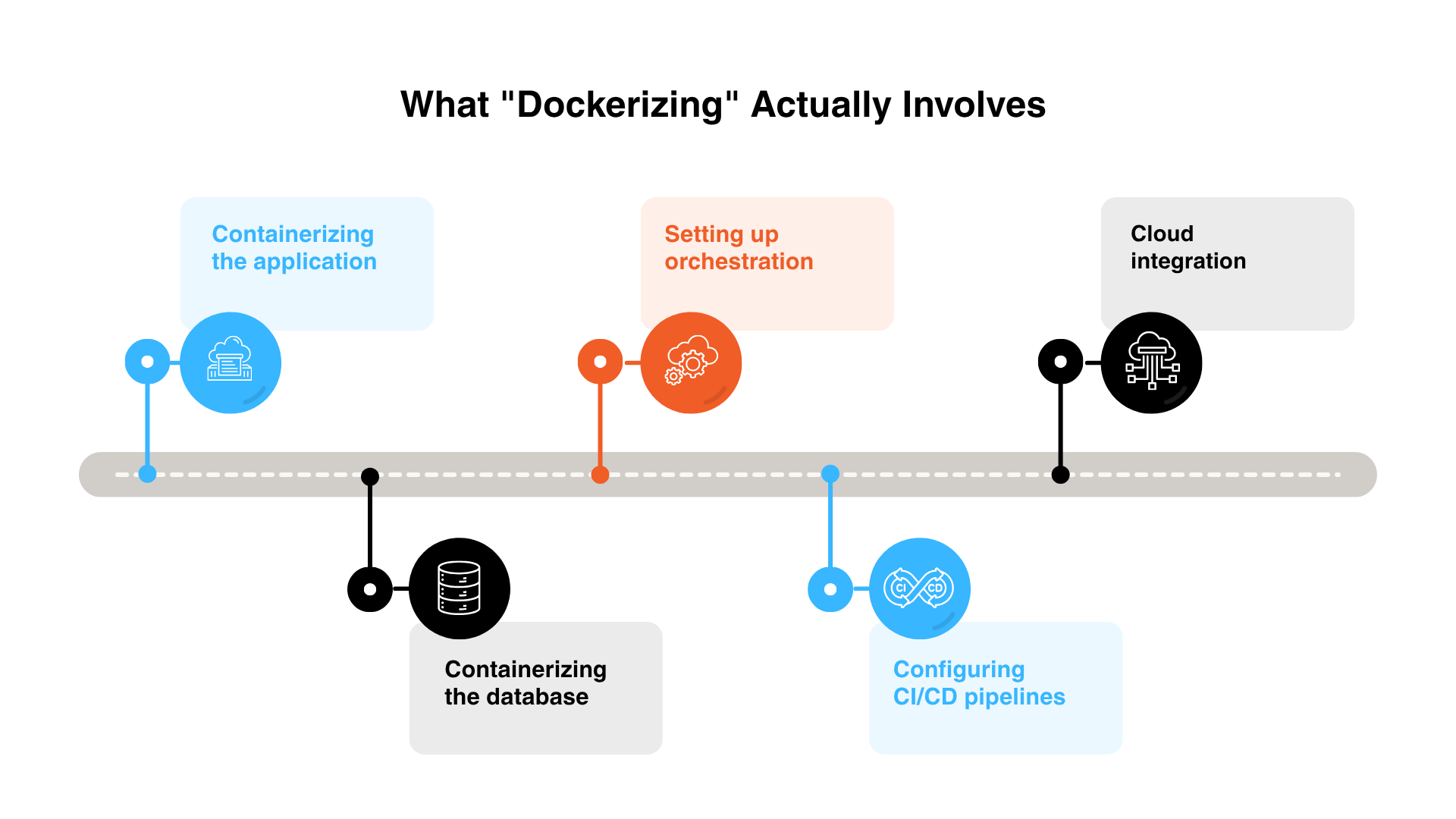
For a business decision-maker, the important thing is understanding the process at a high level — so you can ask the right questions when working with a development partner.
.png "Internal-(2).png")
The DotStark Kentico development team handles all of this end-to-end, including the Docker configuration, cloud architecture, and ongoing support.
Docker itself has a free tier and straightforward paid plans. For most enterprise Kentico projects, the relevant cost is the Team or Business plan for the development team. The containers themselves run on your cloud provider of choice (Azure, AWS, etc.), where costs depend on your infrastructure configuration.
| Docker Plan | Cost (Annual Billing) | Best For | Kentico Fit |
|---|---|---|---|
| Personal | Free | Individual learning & small personal projects | Not suitable for commercial use |
| Pro | ~$9–$11 /user/month | Solo developers; freelancers | Individual dev only |
| Team | ~$15–$16 /user/month | Development teams up to 100 users | Recommended for most projects |
| Business | ~$24 /user/month | Enterprise — SSO, advanced security, compliance | For large enterprise Kentico deployments |
⚠ Pricing last verified June 2026. Docker pricing has changed multiple times since 2022 — always confirm current rates at docker.com/pricing before budgeting. Cloud infrastructure costs (Azure, AWS) are separate and vary by configuration.
Docker is not always necessary. It delivers the most value in specific scenarios. Here is a quick guide to help you assess whether it fits your situation:
| Your Situation | Docker Recommended? |
|---|---|
| Migrating from Kentico 13 to Xperience by Kentico | Yes — build it right from the start |
| Running Xperience by Kentico as a fully managed SaaS | Not needed — Kentico manages the infrastructure |
| Self-hosting XbyK on Azure or AWS | Yes — Docker is natively supported and recommended |
| Team of 5+ developers on the same Kentico project | Yes — eliminates "works on my machine" problems |
| Small static Kentico site with infrequent updates | Evaluate — may be over-engineering for your scale |
| Building custom integrations or heavy customizations | Yes — isolated containers make testing and releases safer |
Docker adds meaningful value, but it requires the right expertise to configure correctly — especially in production. A misconfigured container setup can create security gaps, data persistence issues, or deployment failures that are harder to diagnose than a traditional setup.
This is why working with a certified Kentico partner who also has cloud and DevOps expertise matters. The right partner will design a container architecture that fits your business — not a one-size-fits-all template.
DotStark Technologies is a certified Kentico Silver Partner and Microsoft Partner with 17+ years of experience and 400+ projects delivered across 40+ countries. The team includes 15+ certified Kentico developers who handle everything from initial migration to long-term managed hosting — including Docker-based deployments on Azure.
For businesses approaching the Kentico 13 end-of-support deadline in December 2026, combining the XbyK upgrade with a Docker-ready cloud architecture is one of the highest-ROI decisions you can make this year. It removes technical debt, modernizes your infrastructure, and sets you up to move faster for years ahead.
Explore DotStark's Kentico migration services and Kentico support & maintenance plans to understand what a full engagement looks like.
_1.png "Website-blog-CTA-(5)_1.png")
It means packaging your Kentico website and everything it needs to run — code, settings, dependencies — into a self-contained Docker container. That container behaves identically in every environment, from a developer's laptop to your live cloud server, eliminating the inconsistencies that cause deployment problems.
Yes. Xperience by Kentico (the current platform) officially supports Docker containers for self-hosted deployments on Azure, AWS, and on-premises infrastructure. Learn more about XbyK at DotStark's Kentico services page.
It typically does. Containers use fewer server resources than traditional virtual machines, so you can run more on less infrastructure. A 2024 Forrester study found enterprises using Docker reduced infrastructure costs by an average of 66%. The actual savings depend on your current setup and cloud configuration.
No. If you choose Xperience by Kentico as a fully managed SaaS offering, Kentico handles all the hosting and infrastructure — including containerization behind the scenes. Docker becomes relevant when you self-host on your own Azure, AWS, or on-premises environment.
For an existing Kentico project, containerization typically takes days to a few weeks depending on complexity. When done as part of a broader Kentico 13 upgrade to XbyK, it can be planned into the migration timeline without adding significant extra time.
Not necessarily, but they complement each other well. Azure Web Apps are the simplest way to host Kentico on Azure. Docker containers give you more control, portability, and consistency — especially useful for complex customizations or teams that want CI/CD automation. Talk to DotStark to get a recommendation based on your specific setup.

Ketan Hirapara is a senior software developer with over 8 years of experience, including more than 4 years specializing in Kentico CMS. As a certified Kentico CMS developer, he has strong expertise in ASP.NET Core, MVC, and Web Forms, contributing to a diverse range of projects from web applications to mobile app APIs. Ketan is passionate about sharing his knowledge through Q&A sections on Kentico and Stack Overflow, aiming to inspire others in the tech community.
Follow on LinkedIn

.png)
.png)