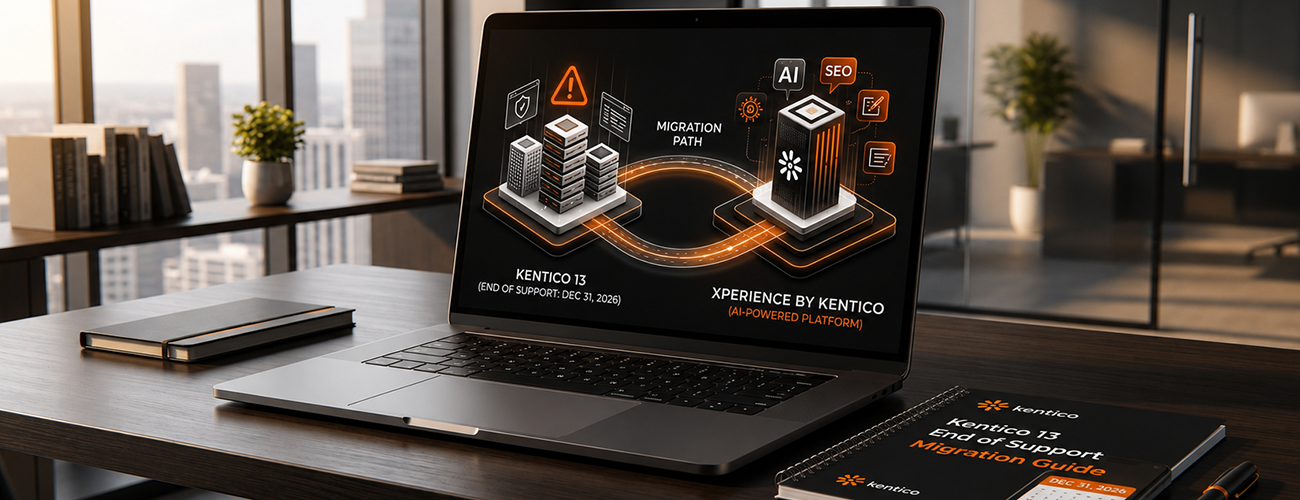
If your website runs on Kentico 13, there's a deadline you can't afford to miss: support officially ends on December 31, 2026. After that date, your Kentico CMS will no longer receive security patches, bug fixes, or vendor support, leaving your website exposed to security vulnerabilities, compliance gaps, and rising technical debt.
The good news is that Kentico has built a clear, low-risk path forward: Xperience by Kentico (XbyK), the vendor's modern, AI-powered digital experience platform. This guide breaks down exactly what the end-of-support deadline means, whether you need an "upgrade" or a "migration," and how to move from Kentico 13 to Xperience by Kentico without disrupting your business.
If you're on Kentico 13 or an older version, you should begin planning your upgrade to Xperience by Kentico now, well before the December 31, 2026 deadline. Most upgrade projects take several months from planning to go-live, so starting early gives your team room for proper testing, staff training, and a smooth, downtime-free launch, rather than a rushed migration under deadline pressure.
Running a CMS past its support window isn't just an inconvenience, it's a genuine business risk. Once Kentico 13 support ends:
On the flip side, Xperience by Kentico gives your marketing and development teams a single, unified Kentico CMS platform that combines content management, digital marketing tools, and native AI, including the AIRA Agentic Marketing Suite and AI-assisted authoring through KentiCopilot, helping teams move faster with less manual work.
Before you start, it's worth clarifying the difference between an upgrade and a migration — they're not the same project, and the right one depends on your starting point.
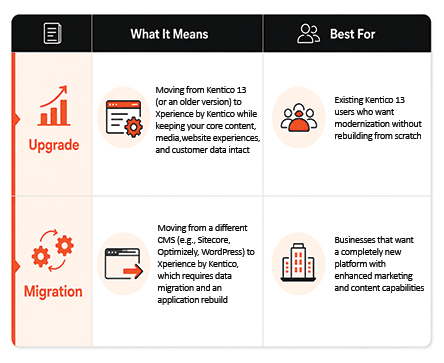
If you're already on Kentico 13, you're almost always looking at an upgrade path rather than a full migration, which is faster, lower-risk, and preserves the content investment you've already made.
A successful upgrade starts well before any code changes. Kentico recommends three foundational steps:
A phased approach minimizes disruption and keeps your website operational throughout the transition. Here's the roadmap:
Every CMS upgrade comes with friction points. Here's how to handle the three most common ones:
Use the fully supported Kentico Migration Tool, which includes AI-guided content migration via KentiCopilot. Clean up outdated or duplicate content before you start, and consider moving large sites in phases rather than all at once.
Build a staging or sandbox environment to test the upgrade before it goes live, and consider a soft launch, running your new Xperience by Kentico site alongside your existing one, then switching traffic over once everything checks out. Kentico's SEO & GEO Specialist agent within the AIRA Agentic Marketing Suite can also help preserve your search visibility during the transition. Scheduling the cutover during off-peak hours further reduces business impact.
Get your content and marketing teams hands-on with the new system before launch, establish internal documentation and post-launch Q&A sessions, and lean on Kentico's own training materials and expert support. AIRA can also provide in-product guidance as your team gets up to speed.
An upgrade isn't just a technical checkbox, it's a measurable business investment. Organizations that move from Kentico 13 to Xperience by Kentico typically see:
Real-world results back this up. Organizations across travel, healthcare, finance, education, sports, and manufacturing have reported outcomes ranging from a 30% lift in conversions to an 84% increase in engagement after upgrading, proof that the ROI extends well beyond the IT department.
Before you kick off your upgrade project, make sure you've covered:
Kentico 13 support ends on December 31, 2026. After this date, the platform will no longer receive security updates or official vendor support.
No. Upgrading from Kentico 13 to Xperience by Kentico preserves your existing content, media, and customer data. A migration, moving from a different CMS entirely, requires a full data migration and application rebuild.
Timelines vary by site size and complexity, but Kentico recommends a phased approach covering planning, technical preparation, execution, testing, and go-live, typically spanning several months for a mid-to-large enterprise site.
Not if it's planned properly. The testing and optimization phase of the upgrade roadmap specifically includes SEO checks and redirect verification, and dedicated tools exist to help preserve search visibility during the transition.
It's possible to use Kentico's own migration tools independently, but most organizations work with a certified Kentico partner to manage technical preparation, custom code adjustments, third-party integrations, and QA, reducing risk and shortening the overall timeline.
December 31, 2026 will arrive faster than most IT roadmaps assume. Starting your Kentico 13 upgrade planning now, rather than in Q4 2026, gives your team the runway to do it right: proper testing, real staff training, and a launch with zero surprises.
As a Kentico Silver Partner,Accelerator Certified & Upgrade Expert DotStark helps organizations plan and execute Kentico 13 to Xperience by Kentico upgrades from assessment through go-live, so your Kentico CMS stays secure, modern, and fully supported well beyond the deadline.
Ready to start your upgrade assessment? Get in touch with our Kentico migration team.

Nitesh Raiwar is a skilled .NET Developer with a strong proficiency in Kentico, AWS, React, and Strapi CMS, currently contributing to DotStark Technologies. With over 4 years of specialized experience in Kentico, AWS, React, Strapi CMS and a solid foundation in software engineering, Nitesh demonstrates exceptional capability in developing efficient and robust applications.
Follow on LinkedIn