.webp)
Moving from Contentful to Xperience by Kentico means exporting your content model and entries from Contentful, remapping that structure to Xperience by Kentico's content types, importing the data through Xperience's content management API, and then deciding whether your existing front end can simply point at the new API or whether the website channel should be rebuilt using the platform's built-in Page Builder. There is no official first party tool for this specific move. Kentico's own Migration Toolkit is built for existing Kentico Xperience 13 sites moving to Xperience by Kentico, not for migrations from a different vendor's platform, so a Contentful move is handled through both platforms' APIs rather than a single packaged tool.
In this guide, we will cover:
- What actually changes when you move from a pure headless CMS to a hybrid headless platform
- The real steps involved in exporting from Contentful and importing into Xperience by Kentico
- What to keep, what to rebuild, and where teams tend to underestimate the work
The Problem With Treating This as a Simple Export and Import
Contentful and Xperience by Kentico are both modern content platforms, but they are not structurally identical, and a few assumptions cause real problems if they go unchecked:
- Contentful's content types, fields, and reference structures do not map one to one onto Xperience by Kentico's content type model, so a direct copy of the schema will not work as is.
- Contentful's rich text field uses its own JSON based document format, which needs to be converted into a format Xperience by Kentico's rich text editor and delivery API can actually render.
- Assets in Contentful live in its own asset system with their own IDs and URLs, and every reference to them inside content entries needs to be updated after the move.
- A front end built against Contentful's GraphQL or REST API will not work unmodified against a different platform's API, even when the underlying content is conceptually the same.
- Multi-locale content, if used in Contentful, needs a deliberate plan for how languages and variants are represented in the new platform, since the two systems do not handle localization identically.
None of this makes the migration impractical. It does mean the project needs to be planned as a content and architecture exercise, not a file copy.
The Core Idea: Move the Content, Then Decide on the Front End
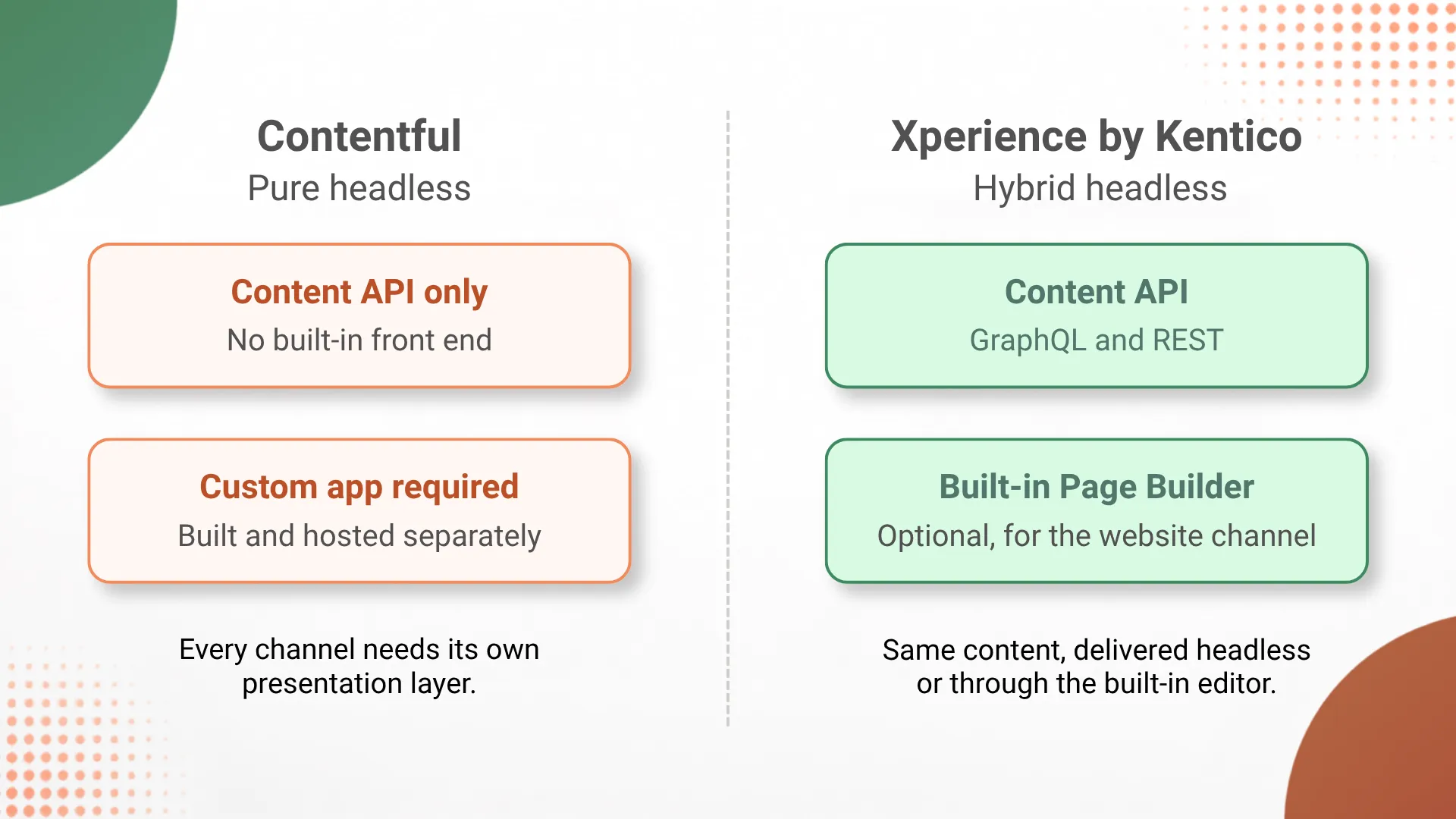
1. Contentful Is Pure Headless, Xperience by Kentico Is Hybrid Headless
Contentful only stores and serves content through APIs. It has no built-in page rendering or visual editing surface, so every channel that uses it needs its own custom built front end. Xperience by Kentico can do the same, serving content through GraphQL and REST APIs, but it also ships a built-in Page Builder for a website channel, so the same content can be edited visually without a separate application if that fits your team better. We go deeper into this distinction in our DXP versus CMS comparison, since a hybrid headless platform behaves closer to a DXP than a plain headless CMS.
2. Content Modeling Has to Be Redesigned, Not Copied
Xperience by Kentico's content modeling is based around reusable content types with typed fields, similar in spirit to Contentful's model, but the specific field types, validation options, and reference mechanics differ enough that each content type needs to be rebuilt deliberately in the new system rather than imported as a schema file.
3. Entries and Assets Move Through Each Platform's API
Content Contentful exposes entries and assets through its Content Management API, and the standard way to get data out at scale is through Contentful's own CLI export or that API directly. On the Xperience by Kentico side, content items and media are created through its content management API, which means a migration script typically reads from one API and writes to the other, with a mapping layer in between. This kind of scripted, two-API migration is the same pattern our team follows on Xperience by Kentico development projects generally, not something specific to Contentful.
4. The Front End Can Often Be Reused, With Changes
Because both platforms are queried over HTTP, a front end originally built to call Contentful's API can frequently be adapted to call Xperience by Kentico's GraphQL or REST API instead, updating queries and data shapes rather than rebuilding the application from scratch, as long as the new content model was designed with that reuse in mind.
The Contentful Setup (Where You Are Starting From)
Here is what a typical Contentful based setup looks like before migration.
Step 1: Content Lives in Contentful's Content Types
Editors manage entries inside Contentful's web app, structured around content types defined in its schema, with rich text, references, and assets stored in Contentful's own format.
Step 2: A Custom Front End Queries the API
A separate application, a website, an app, or both, queries Contentful's GraphQL or REST API to retrieve content and renders it independently, since Contentful has no built-in presentation layer.
Step 3: Every New Channel Repeats the Pattern
Adding a new channel means building another consumer of the same API, since Contentful itself does not provide any channel specific delivery tooling beyond the API.
Step 4: Editors Depend Entirely on the Front End for Preview
Because there is no built-in page rendering, editors typically rely on a preview environment maintained by the development team to see how content will actually look once published.
The Migration Path to Xperience by Kentico
Here is the same content, moved through a structured migration.
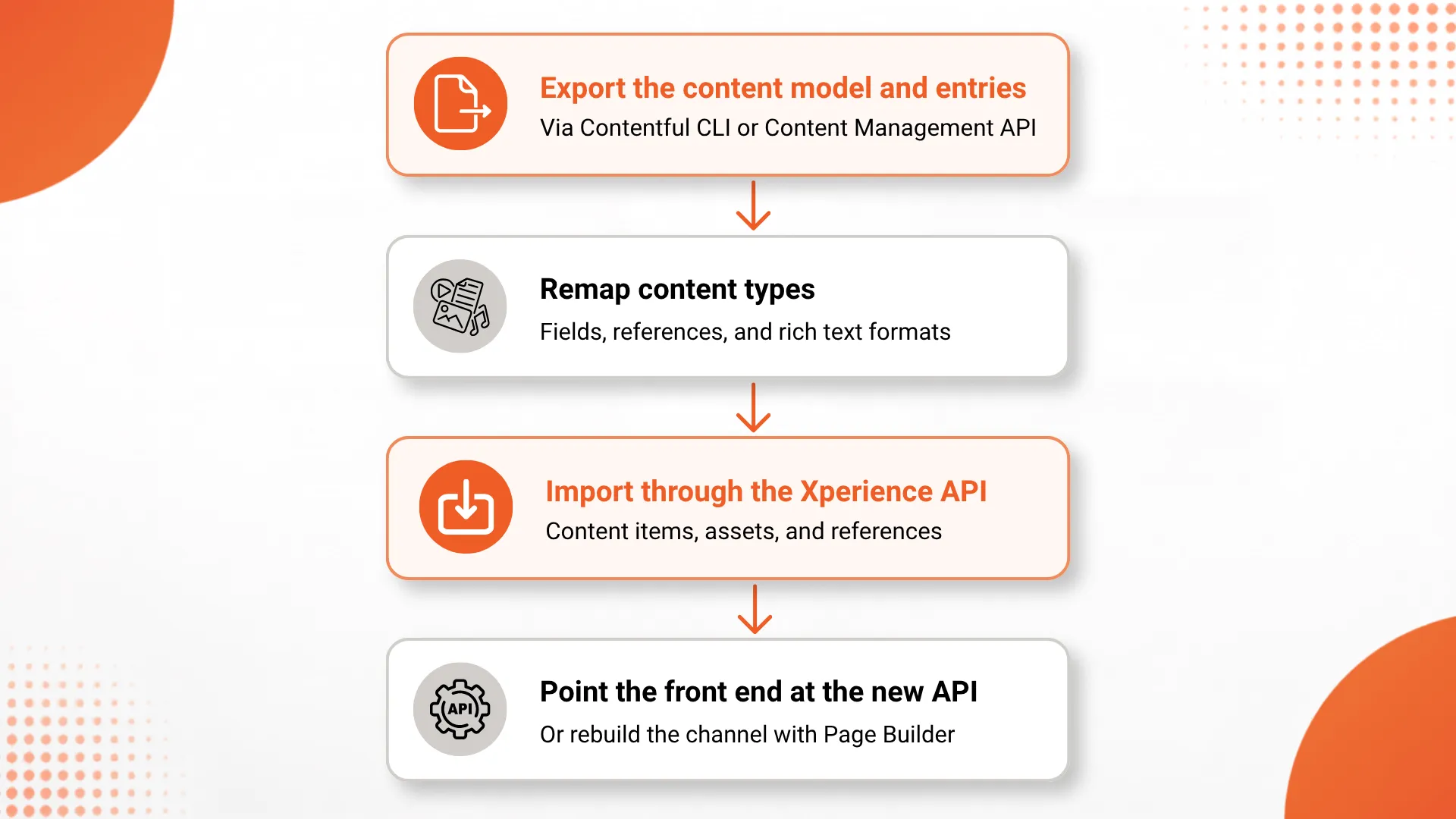
Step 1: Export the Content Model and Entries
The content model, entries, and asset references are exported from Contentful using its CLI export command or the Content Management API, producing a structured, machine readable snapshot of everything that needs to move.
Step 2: Remap Content Types
Each Contentful content type is redesigned as an Xperience by Kentico content type, with fields, references, and rich text handling mapped deliberately rather than assumed to be equivalent.
Step 3: Import Through the Xperience API
A migration script reads the exported Contentful data and writes it into Xperience by Kentico through its content management API, creating content items, uploading assets, and wiring up references according to the new model.
Step 4: Point the Front End at the New API, or Rebuild With Page Builder
Depending on what the team wants going forward, the existing front end is updated to query Xperience by Kentico's GraphQL or REST API, or the website channel is rebuilt using the platform's built-in Page Builder so editors gain a visual editing surface they did not have with Contentful.
Implementation Detail: Rich Text Needs a Real Conversion Step
Worth calling out specifically: Contentful's rich text field stores content as a structured JSON document, not plain HTML. Moving that content into Xperience by Kentico's rich text editor, which is built around an HTML based format, requires an actual conversion step in the migration script rather than a straight field copy. Skipping this step is one of the most common ways teams end up with broken formatting after a migration, since the two formats are not interchangeable without translation.
Contentful vs Xperience by Kentico
| Aspect | Contentful | Xperience by Kentico |
|---|---|---|
| Architecture | Pure headless, API only | Hybrid headless, API and built-in Page Builder |
| Editor preview | Depends on a custom built preview app | Built-in visual preview available for the website channel |
| Rich text format | Contentful's own JSON document format | HTML based rich text editor |
| Official migration tooling | Not applicable | Migration Toolkit exists for Kentico Xperience 13 only |
| Content delivery | GraphQL and REST APIs | GraphQL and REST APIs |
| New channel setup | Requires a new custom front end each time | Can reuse the same content via API, or use Page Builder for the website channel |
What's Working Well
The API First Model Transfers Cleanly. Because both platforms deliver content over HTTP through GraphQL and REST, the core integration pattern a team already understands from Contentful carries over directly to Xperience by Kentico.
Editors Gain an Option They Did Not Have Before. Teams that found Contentful's lack of a built-in preview or page building surface frustrating can use Xperience by Kentico's Page Builder for the website channel, without giving up API delivery for other channels.
A Forced Content Audit Often Improves the Model. Because content types cannot be copied automatically, teams migrating from Contentful frequently end up simplifying or cleaning up content structures that had accumulated years of ad hoc changes.
Multi-Channel Delivery Stays Intact. A migration does not have to reduce the number of channels a business serves. The same hybrid headless architecture that supports a rebuilt website can continue serving apps, kiosks, or partner integrations through the API.
The Honest Trade-Offs
There Is No One Click Migration. Unlike an in-platform version upgrade, moving between two different vendors' content platforms is inherently a custom engineering project, even with both platforms' APIs available to work with.
Rich Text and References Need Real Testing. Automated field mapping can carry most content across, but rich text formatting and cross references between entries need manual verification after import, not just a successful script run.
Front End Reuse Has Limits. A front end can often be adapted rather than rebuilt, but if the content model changes meaningfully during remodeling, which is common, the front end's queries and components will need real updates, not just a new API endpoint.
Multi-Locale Content Adds Planning Overhead. If Contentful content spans multiple languages or locale variants, deciding how that maps onto Xperience by Kentico's localization approach needs to happen before the import, not as an afterthought.
Surprising Decisions Worth Noting
Migrating Can Be a Chance to Drop Page Building Debt. Some teams migrating from Contentful choose not to replicate every custom front end feature from day one, instead using the migration as a natural point to decide which channels actually need a fully custom application versus which can use Xperience by Kentico's built-in Page Builder instead.
The Migration Toolkit Name Can Mislead Buyers. Because Kentico publishes an official Migration Toolkit, some teams assume it covers moves from any CMS. It specifically targets existing Kentico Xperience 13 installations, so a Contentful migration should be scoped and budgeted as custom integration work from the start.
Keeping Both Systems Live During Cutover Reduces Risk. Teams that ran Contentful and Xperience by Kentico in parallel for a short period, validating content and testing the new front end before fully switching over, generally reported fewer surprises than teams that migrated everything and cut over in a single step.
The End Result
A move from Contentful to Xperience by Kentico is a real migration project, not a vendor swap behind an unchanged API contract. The content itself can move, and in most cases the front end pattern your team already knows, calling a GraphQL or REST API, carries over conceptually. What changes is the underlying content model, which has to be deliberately redesigned, and the rich text and reference data, which need explicit conversion rather than a direct copy.
The upside is real too. Teams that make this move gain the option of a built-in Page Builder for channels where visual editing helps, without losing the API first delivery that made Contentful useful in the first place. That flexibility is the main reason this specific migration path is worth the planning it requires.
If your team is considering this move, start by exporting and reviewing your actual Contentful content model before writing any migration code. Knowing exactly what needs to be remapped is what turns this from an open ended project into a scoped one. Our overview of Xperience by Kentico's features, pricing, and migration paths is a useful next read once you have that content model mapped out.
Frequently Asked Questions
Does Kentico provide an official tool to migrate from Contentful?
No. Kentico's official Migration Toolkit is built specifically to move existing Kentico Xperience 13 sites to Xperience by Kentico. A move from Contentful, a different vendor's platform, has no official first party toolkit, so it is handled through Contentful's export and Content Management API on one side and Xperience by Kentico's content management API on the other.
Can I keep my existing front end application after migrating from Contentful?
Often yes. Xperience by Kentico exposes content through GraphQL and REST APIs, so a front end built to consume Contentful's API can usually be repointed at the new API with query and schema changes, without a full rebuild, as long as the content model was remapped consistently.
What is the hardest part of moving from Contentful to Xperience by Kentico?
Remodeling content is usually the hardest part. Contentful's content types, references, and rich text format do not map one to one onto Xperience by Kentico's content types and fields, so each content type needs to be redesigned and tested before entries are imported, not just copied across.
Is Xperience by Kentico headless, like Contentful?
Xperience by Kentico is hybrid headless. It can deliver content purely through APIs like Contentful does, and it also includes a built-in Page Builder for a website channel, so a team can choose API only delivery, a built-in editing experience, or both from the same content.
How long does a Contentful to Xperience by Kentico migration usually take?
Timelines depend on content model complexity and volume. A small site with a few content types can often move in a matter of weeks, while a large site with many content types, locales, and a custom front end typically needs a longer, phased migration measured in months.
Related reading on DotStark
- Xperience by Kentico Solutions
- Xperience by Kentico: Features, Pricing and Migration
- DXP vs CMS: What Is the Difference?
- Xperience by Kentico Development Services

.webp)