.png)
Being an AI Strategy Consultancy, we think most companies are sitting on a graveyard of knowledge: PDFs buried in shared drives, Confluence pages nobody remembers writing, and Slack threads with the one answer that could have saved a new hire three hours. Traditional keyword search can't make sense of any of it. It matches words, not meaning.
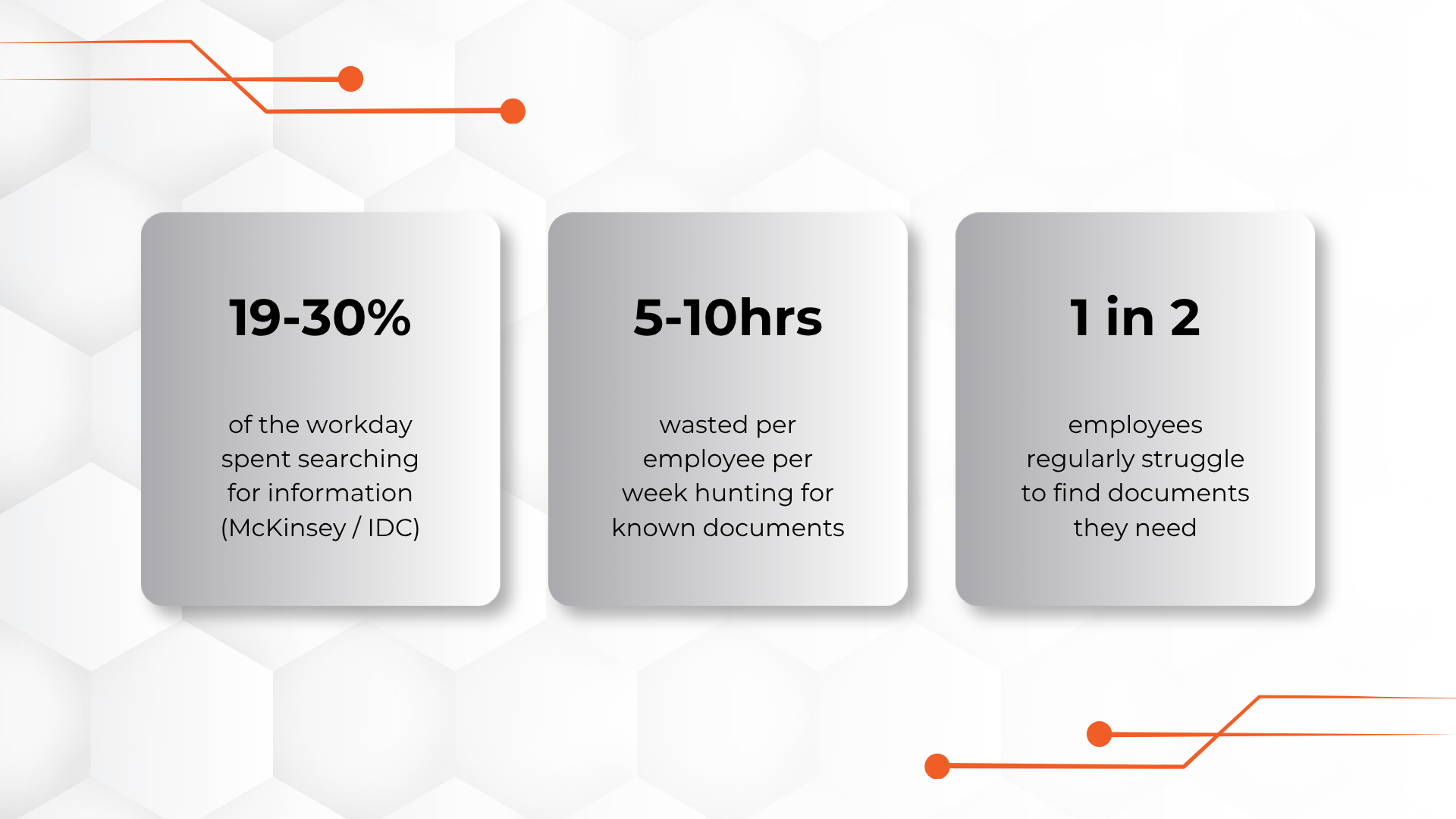
Independent research backs up what most employees already feel: studies from McKinsey and IDC put the time knowledge workers spend hunting for information anywhere from roughly a fifth to nearly a third of the workday. That's not a minor inefficiency it's a structural drag on every team that depends on institutional knowledge to do its job.
AI-powered search changes that equation entirely. Instead of forcing employees to guess the exact phrase buried in a document, an AI search system understands intent, retrieves the right passages across thousands of files, and generates a direct, cited answer in seconds. This guide walks through exactly how to build that system from document ingestion to chunking, embedding, retrieval, and rollout with the trade-offs most vendor pages leave out.
Search inside most organizations fails for three structural reasons:
An AI-powered search system, typically built on Retrieval-Augmented Generation (RAG), solves all three by combining semantic search with a language model that reads the retrieved content and writes a direct answer, citations included.
It's worth putting a number on the problem before investing in a fix. Multiple independent studies converge on the same conclusion: information search is one of the largest hidden taxes on knowledge-worker productivity.
| Finding | Source (paraphrased) |
|---|---|
| Knowledge workers spend roughly a fifth to a third of the workday searching for information | McKinsey Global Institute / IDC research |
| A large share of employees regularly struggle to locate documents they know exist | Adobe workplace productivity research |
| A meaningful share of "new" documents are unnecessary recreations of existing, unfound content | IDC enterprise content research |
| Organizations with strong knowledge-management systems report large reductions in time lost to search | McKinsey knowledge-management research |
The pattern across all of these studies is the same: the knowledge already exists inside the company. The bottleneck is retrieval, not content creation — exactly the problem AI-powered search is designed to fix.
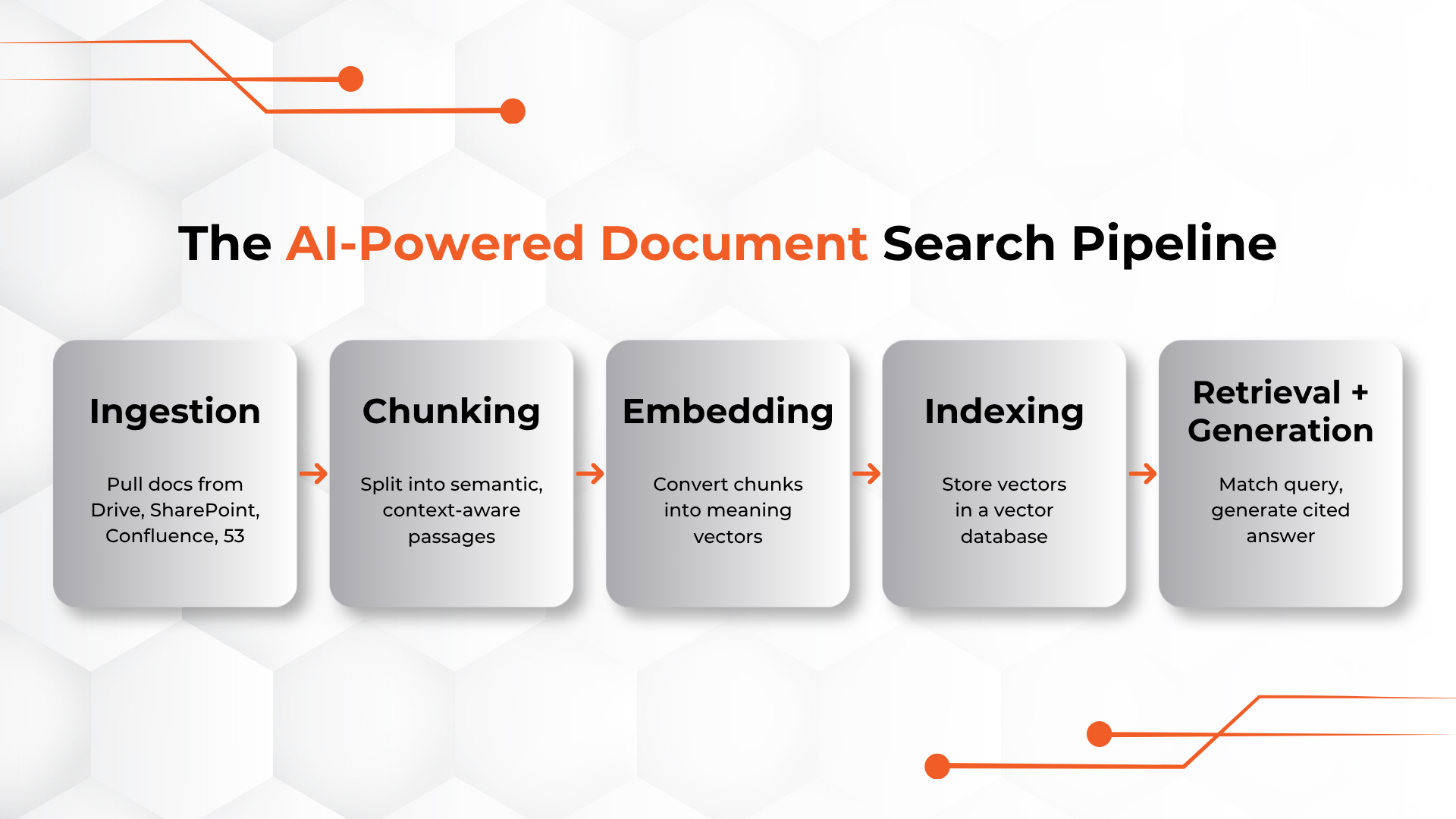
At a technical level, every AI-powered internal search system follows the same five-stage pipeline, regardless of vendor or tool.
| Stage | What Happens | Common Tools |
|---|---|---|
| 1. Ingestion | Documents are pulled from source systems and normalized into text | Connectors for Google Drive, SharePoint, Confluence, S3 |
| 2. Chunking | Long documents are split into smaller, semantically coherent passages | LangChain, LlamaIndex, custom scripts |
| 3. Embedding | Each chunk is converted into a vector representing its meaning | OpenAI, Voyage AI, Cohere embedding models |
| 4. Indexing/Storage | Vectors are stored for fast similarity search | Pinecone, Weaviate, pgvector, Elasticsearch |
| 5. Retrieval + Generation | A query is embedded, matched against stored vectors, and top results are passed to an LLM to generate an answer | Claude, GPT-4 class models, internal orchestration layer |
This pipeline is what's known as RAG (Retrieval-Augmented Generation) the industry-standard approach for grounding an AI model's answers in your actual documents instead of its general training knowledge.
Understanding why RAG outperforms legacy enterprise search makes it much easier to justify the investment internally.
| Dimension | Keyword Search | RAG-Based AI Search |
|---|---|---|
| Matches on | Exact words or stems | Meaning and intent |
| Output | A ranked list of documents | A direct answer, with citations |
| Handles synonyms | Poorly — requires manual synonym lists | Natively, via semantic embeddings |
| Effort to get an answer | User reads several documents | User reads one generated answer |
| Improves over time | Only with manual tuning | Improves with better chunking, embeddings, and feedback loops |
Chunking gets one sentence in most vendor explainers, but it's usually the single biggest lever on answer accuracy. If chunks are too large, the embedding blurs multiple ideas together and retrieval gets imprecise. If chunks are too small, the model retrieves fragments with no surrounding context and gives thin or wrong answers.
| Strategy | How It Works | Best For | Watch Out For |
|---|---|---|---|
| Fixed-size chunking | Split every N tokens (e.g. 500) with some overlap | Quick prototypes, uniform documents | Cuts sentences and ideas in half |
| Recursive / structure-aware | Split on headings, paragraphs, then sentences as a fallback | Policy docs, wikis, structured reports | Requires clean source formatting |
| Semantic chunking | Group sentences by embedding similarity so each chunk is one coherent idea | Long-form technical or legal content | More compute-intensive to build |
| Document-aware chunking | Respect existing structure: tables stay whole, code blocks stay whole | Engineering docs, API references, contracts | Needs custom parsers per file type |
A reasonable default for most internal document sets is 300–800 token chunks with roughly 10–15% overlap, built on top of structure-aware splitting rather than a blind fixed-size cut. Test chunk size against a set of real employee questions before locking in a default — the right size depends more on how your documents are written than on any universal best practice.
The embedding model converts each chunk into a vector, and it's the component most teams pick without testing. A few practical trade-offs to weigh:
| Factor | What to Check |
|---|---|
| Domain fit | General-purpose embedding models can underperform on dense technical, legal, or medical vocabulary — test against your own document set, not a public benchmark |
| Dimensionality | Higher-dimensional vectors capture more nuance but cost more to store and search at scale |
| Hosting | Hosted APIs (OpenAI, Voyage AI, Cohere) are fastest to set up; self-hosted open models give more control over data residency |
| Re-embedding cost | Switching embedding models later means re-embedding your entire document set — factor this into the initial choice |
| Multilingual support | If your documents span multiple languages, confirm the model was trained for cross-lingual retrieval, not just multilingual text |
Run a small bake-off before committing: embed the same 200–300 real chunks with two or three candidate models, run the same set of test queries against each, and score retrieval precision manually. The winner is rarely the model with the best marketing page.
Once chunks are embedded, they need somewhere to live that supports fast similarity search at your scale.
| Vector Store | Good For | Notes |
|---|---|---|
| Pinecone | Fast setup, managed scaling | Paid, cloud-hosted |
| Weaviate | Hybrid search (keyword + vector) | Open-source, self-hostable |
| pgvector | Teams already on PostgreSQL | Lower cost, simpler ops |
| Elasticsearch (vector support) | Existing Elastic infrastructure | Familiar to enterprise IT teams |
For most internal search projects under a few million chunks, the choice matters less than getting chunking and embeddings right first — see the vector database comparison guide if you're evaluating options at larger scale.
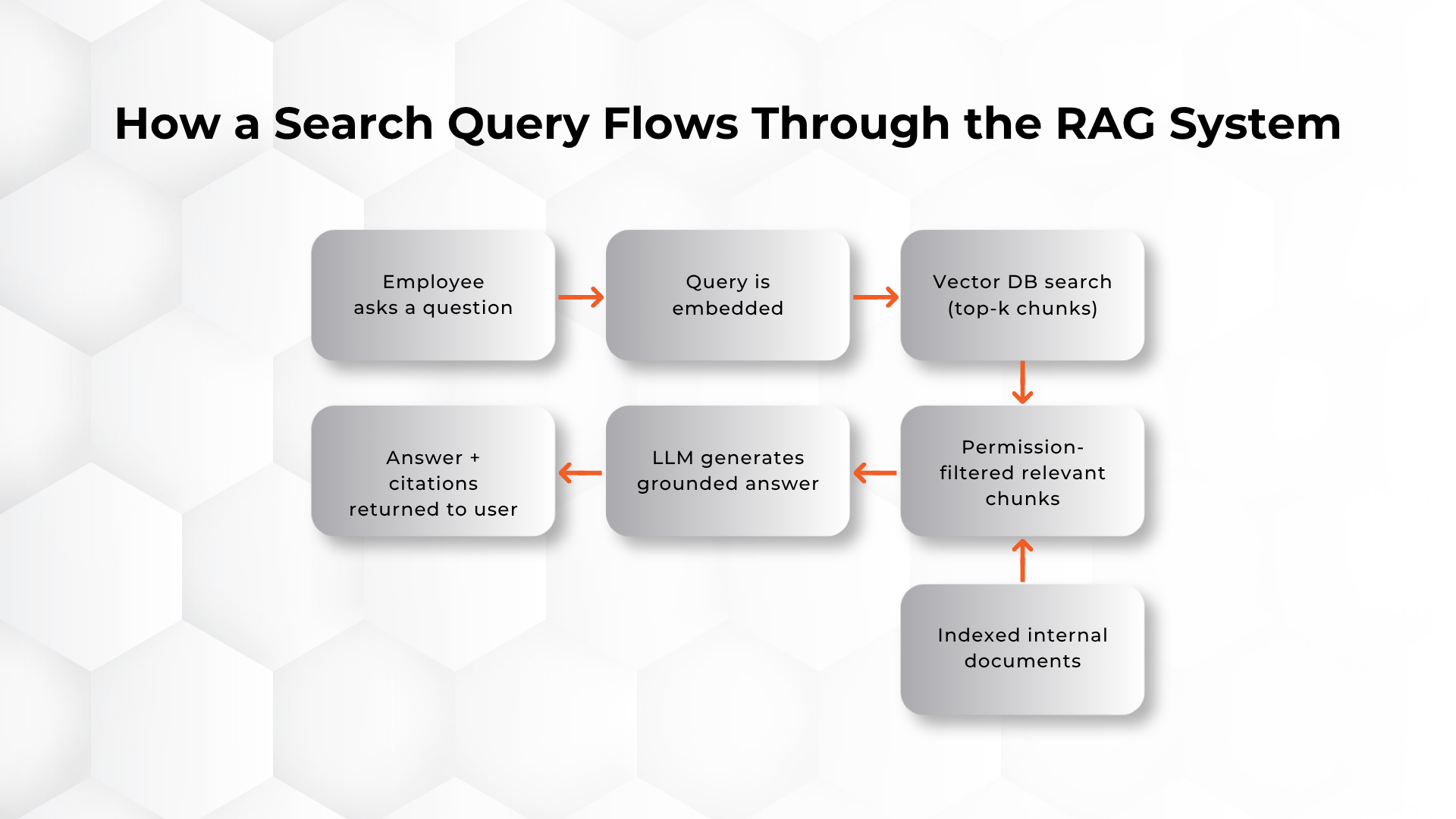
Once a query comes in, the system embeds it, retrieves the top-matching chunks, and feeds them to an LLM with an instruction to answer only using the retrieved context — reducing hallucination and keeping answers traceable to a source document.
Basic "embed the query, grab the top-k chunks" retrieval works for a pilot, but production systems usually layer in a few refinements:
None of these are required to launch a pilot. They're the difference between a system that works in a demo and one that holds up against real employee questions at scale.
This is the step most internal AI search projects underestimate. The system must respect existing document permissions — an AI search tool that surfaces HR salary bands to the wrong employee is a bigger problem than the search gap it was meant to solve.
Permission-aware retrieval should be built in from day one, not bolted on later.
Launch with a single team, track query logs, and measure two things: answer accuracy (does the citation actually support the claim?) and query deflection (are fewer tickets/questions going to human experts?). Use that data to expand document coverage in phases.
| Metric | What It Tells You | How to Track It |
|---|---|---|
| Answer accuracy | Whether citations genuinely support the generated answer | Manual review of a sampled set of real queries each week |
| Query deflection | Whether fewer questions escalate to human experts | Compare ticket/Slack-question volume before and after launch |
| Coverage gaps | Which questions the system can't answer well | Log and cluster "no good answer" responses |
| Time-to-answer | Whether the tool is actually faster than the old way | Compare median resolution time against baseline search |
An AI search system is only as good as its most recent sync. Set up scheduled or event-driven re-indexing so that when a document is edited, archived, or deleted, the vector store updates automatically. Stale answers erode trust faster than no answers at all — a single confidently wrong response can undo months of adoption work.
When an internal AI search system underperforms, the cause is almost always one of a handful of predictable issues — not the language model itself.
| Symptom | Likely Cause | Fix |
|---|---|---|
| Answers are vague or generic | Chunks are too large or context is being lost at chunk boundaries | Reduce chunk size, add overlap, or switch to structure-aware chunking |
| Right document exists but never gets retrieved | Embedding model doesn't fit the domain vocabulary, or metadata filters are too aggressive | Re-test embedding models on real queries; loosen filters |
| Answers cite the wrong or outdated version | Duplicate documents in the index, or re-indexing isn't triggered on edits | De-duplicate before ingestion; add event-driven re-indexing |
| Model answers confidently with no real source | Prompt allows the model to answer without retrieved context | Force the model to say "I don't have enough information" when retrieval returns nothing relevant |
| Wrong employees seeing sensitive content | Permissions aren't enforced at the retrieval layer | Filter by access rights before similarity search, not after |
AI-powered document search isn't a single-purpose tool — the same underlying architecture supports very different workflows depending on which team is using it.
| Department | Example Query | What It Replaces |
|---|---|---|
| IT / Helpdesk | "How do I reset my VPN access?" | Searching a ticketing wiki or asking a colleague |
| HR | "What's our parental leave policy in Germany?" | Emailing HR and waiting for a reply |
| Sales | "What objection-handling guidance exists for enterprise pricing pushback?" | Digging through shared drives before a call |
| Engineering | "How is authentication handled in the payments service?" | Reading outdated architecture docs or pinging the author |
| Customer Support | "What's the refund policy for annual subscriptions?" | Escalating to a senior agent |
| Legal / Compliance | "What's our standard DPA clause?" | Searching a shared contracts folder |
Once the architecture is clear, most teams face a build-vs-buy decision. There's no universally right answer — it depends on document volume, compliance requirements, and available engineering time.
| Factor | In-House Build | Vendor Platform |
|---|---|---|
| Time to first pilot | Weeks to a couple of months | Days to a few weeks |
| Customization | High — full control over chunking, ranking, UI | Limited to platform configuration |
| Ongoing engineering investment | Continuous (indexing, tuning, maintenance) | Mostly handled by vendor |
| Data residency control | Full control | Depends on vendor architecture |
| Best fit | Large volume, strict compliance, existing AI/ML team | Faster time-to-value, smaller eng team |
If buying rather than building, internal AI search tools generally fall into three categories. This isn't an endorsement of any specific vendor — evaluate current pricing, security posture, and integrations directly before committing.
A useful evaluation exercise: run the same 20 real employee questions through every vendor you're considering, using your own documents, before signing anything. Marketing demos rarely reflect performance on messy, real internal content.
Internal AI search introduces a new attack surface if it's not designed carefully. Three things matter most:
Getting this wrong doesn't just create a security risk — it can also slow adoption, since employees and leadership need to trust that the system won't leak sensitive information across teams.
Employees will only rely on the system if they believe its answers. Trust isn't a marketing claim here — it's built through four concrete practices during the build, not added afterward.
Pilot before you scale. Run the system with real users on real tasks before a company-wide launch, and treat their feedback as the signal for whether retrieval quality is good enough to expand.
Put subject-matter owners in the loop. The people who own the source documents should review a sample of generated answers before rollout, because they're the only ones who can catch a confidently wrong answer.
Weight current documents over old copies. When two versions of a document conflict, the system should favor the current, official one — stale duplicates are one of the most common causes of wrong answers.
Always show the sources. Every answer should show exactly which documents it drew from, and the model should say so when it doesn't have enough grounding to answer — never guess.
Teams that succeed with internal AI search tend to follow a similar phased timeline rather than attempting a company-wide launch on day one.
| Phase | Timeframe | Focus |
|---|---|---|
| Phase 1: Foundation | Weeks 1–2 | Pick one document set, map permissions, choose chunking and embedding approach |
| Phase 2: Build | Weeks 3–6 | Stand up ingestion, chunking, embedding, and retrieval; connect a generation model |
| Phase 3: Pilot | Weeks 7–10 | Launch to a single team, collect real queries, measure accuracy and deflection |
| Phase 4: Refine | Weeks 11–12 | Tune chunk size, retrieval settings, and prompts based on pilot feedback |
| Phase 5: Expand | Month 4 onward | Add document sets and departments in phases, re-validating permissions each time |
| Term | Definition |
|---|---|
| RAG (Retrieval-Augmented Generation) | An architecture that retrieves relevant document passages and feeds them to a language model to generate a grounded answer |
| Chunk | A smaller passage a document is split into before embedding, sized to balance context and precision |
| Embedding | A numerical vector representing the meaning of a chunk of text, used for similarity search |
| Vector store / vector database | A database optimized for storing and searching embeddings by similarity |
| Hybrid search | Combining keyword-based and vector-based search in a single retrieval step |
| Re-ranking | Reordering an initial set of retrieved results with a more precise model before generation |
| Query deflection | The reduction in questions escalated to human experts after a self-serve answer system launches |
| Permission-aware retrieval | Filtering search results by the requesting user's existing document access rights |
It's a system that uses semantic search and a language model to let employees ask natural-language questions and receive direct, cited answers pulled from internal documents, rather than a list of links to click through.
RAG (Retrieval-Augmented Generation) retrieves the most relevant document passages for a query and feeds them to an AI model to generate a grounded answer. It keeps answers tied to actual company documents instead of the model's general knowledge, reducing hallucination.
A focused pilot on one document set can go live in a few weeks. Company-wide rollout with full permission controls, multiple data sources, and quality tuning typically takes a few months — the 90-day roadmap above is a reasonable baseline.
Yes, when the system is built with permission-aware retrieval, data encryption, and a model deployment that doesn't train on your data. Access controls must mirror your existing document permissions exactly.
A chatbot with a handful of uploaded files works for small, static datasets. A true AI search system continuously indexes thousands of documents across live systems, updates as content changes, and enforces per-user permissions at scale.
In-house builds offer more control and customization but require ongoing engineering investment. Vendor platforms get you live faster but with less flexibility. The right choice depends on document volume, compliance needs, and internal engineering capacity.
Track answer accuracy (whether citations genuinely support the generated answer) and query deflection (whether fewer questions are escalated to human experts). Both should be measured during the pilot phase before wider rollout.
No it depends on it. Duplicate, outdated, or poorly structured documents will produce duplicate, outdated, or poorly structured answers. Cleaning and tagging content before ingestion has a bigger impact on quality than any model choice.
A production-grade system re-indexes on a schedule or in response to change events, so the vector store and permissions stay in sync with the source system. Without this, the search system will confidently serve outdated answers.
Ongoing cost is driven mainly by embedding volume, vector storage size, and generation-model usage, plus engineering time if self-built. Vendor platforms usually price per seat or per query volume; DIY stacks trade lower software cost for higher engineering overhead.
Background reading on the concepts above:
DotStark helps enterprises design and build permission-aware RAG search systems from document ingestion and chunking strategy to embedding, retrieval, and a phased 90-day rollout — so your team spends less time searching and more time working.
Talk to Our AI Team About Building Your Internal Search System →

Devang Bhardwaj is an AIML Engineer at DotStark Technologies (India) Pvt. Ltd., specializing in machine learning, deep learning, and GenAI-driven systems. With hands-on experience building end-to-end intelligent solutions - from data preparation and model development to API integration and deployment - he has worked on projects spanning RAG systems, computer vision, forecasting, and fine-tuning workflows. Skilled in Python, SQL, FastAPI, LangChain, PyTorch/TensorFlow, Docker, and vector database-based architectures, Devang is passionate about solving real-world problems through practical AI and continuously building systems that are both intelligent and production-ready.
Follow on LinkedIn


_2.png)
_1.png)