

Seven categories of AI agent are already handling the repetitive parts of a typical workday: triaging inbound email, coordinating schedules, summarizing meetings, answering questions from internal documents, booking customer appointments, pulling reports, and screening support tickets.
None of them replace a job outright; each one removes a specific, well-defined chore so a person spends less time on busywork and more time on judgment calls. The agents that actually work in production share three traits: a narrow job description, a way to verify their own output, and a clear rule for when to stop and ask a human instead of guessing.
This article covers the seven agent categories doing real work right now, why handling these tasks manually creates predictable bottlenecks, a before-and-after look at a typical workday, and the specific rule that decides whether a task is safe to automate or needs a human in the loop.
The Problem With Handling These 7 Tasks Manually
None of the tasks below are hard on their own. The problem is volume and repetition, done the same way, dozens of times a day, across an entire team:
- Inbox overload eats the first hour of the day. Sorting, prioritizing, and drafting replies to a full inbox routinely consumes the most alert part of a person's morning before any real work starts.
- Scheduling burns hours that never show up on a timesheet. A single meeting can take five or six emails to lock in once time zones, availability, and rescheduling get involved.
- Meeting notes and follow-ups quietly disappear. Without someone assigned to write them up, action items from a call are often forgotten within a day.
- Knowledge is trapped in documents nobody has time to search. The correct policy or answer usually already exists somewhere; finding it can still take longer than doing the task itself.
- Manual reporting means decisions run on stale numbers. If a report takes half a day to assemble by hand, the decision made from it is already based on data that is half a day old.
The Core Idea: Seven Agents, Seven Narrow Jobs
The agents actually being deployed today are not general-purpose digital employees. Each one has a narrow job description, which is exactly what makes it reliable enough to trust with real tasks.
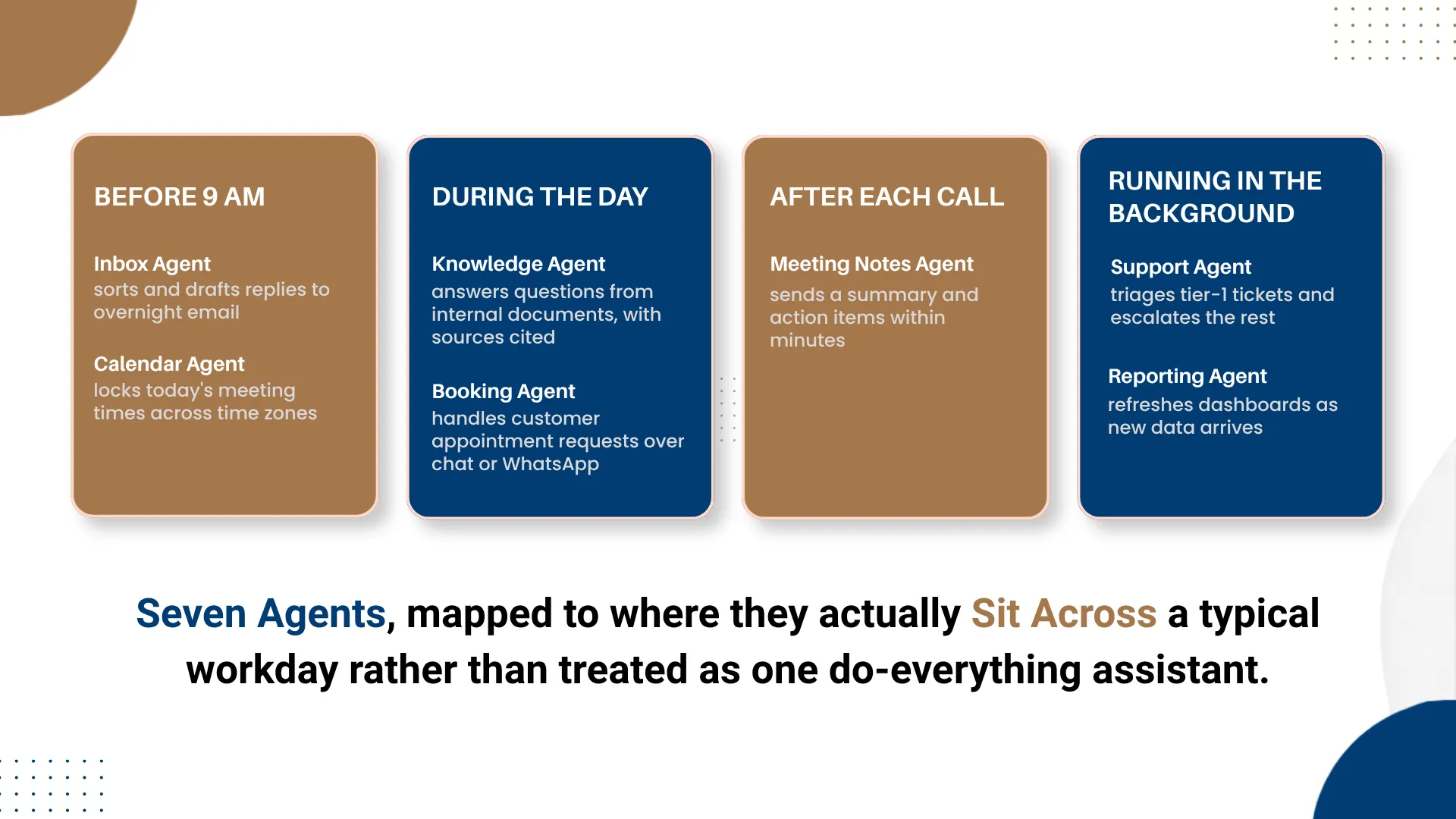
1. Inbox and email triage agent. Reads incoming email, sorts it by urgency, and drafts routine replies for review, so the inbox is already organized before a person logs in.
2. Scheduling and calendar agent. Checks multiple calendars, proposes times that actually work, and locks the meeting without the usual back-and-forth thread.
3. Meeting notes and follow-up agent. Turns a call recording or transcript into a summary and a list of action items, sent out while the conversation is still fresh.
4. Enterprise knowledge agent. Answers questions from a company's own documents and cites exactly where the answer came from. DotStark's own RAG365 is built for this category: it turns policies, contracts, and manuals into a searchable assistant that names the source document and page behind every answer.
5. Customer booking agent. Handles appointment requests over chat or WhatsApp, checks live availability, and confirms the slot without a receptionist managing every message. DotStark's Aurexa agent works this way, verifying the customer by a one-time code before a booking is locked in, so confirmed slots stay accurate.
6. Data and reporting agent. Pulls numbers from connected systems and assembles a dashboard or report automatically, instead of someone exporting spreadsheets by hand every week.
7. Customer support triage agent. Reads an incoming support request, resolves the simple, well-documented ones directly, and routes anything unclear or sensitive to a human agent with context attached.
Two Journeys: A Typical Workday, Before and After
Journey A: The Manual Workday
Step 1: Start the day by clearing the inbox. The first 45 minutes go to reading, sorting, and replying to whatever arrived overnight, before any planned work begins.
Step 2: Chase down a meeting time by email. Coordinating one meeting across a few calendars takes several messages and at least one round of rescheduling.
Step 3: Take notes, then lose track of them. Notes from the call sit in a document nobody circulates, and the action items are only remembered if someone happens to ask.
Step 4: Dig for an answer across three systems. Finding the current version of a policy or contract term means checking email, a shared drive, and asking a colleague, in that order.
Journey B: The Agent-Assisted Workday
Step 1: Log in to an inbox that is already sorted. The inbox agent has triaged overnight email and drafted replies to the routine messages, ready for a quick review.
Step 2: The meeting is already on the calendar. The scheduling agent checked availability and locked a time automatically, with no email thread required.
Step 3: A summary lands minutes after the call ends. The meeting notes agent sends out action items while the conversation is still fresh for everyone involved.
Step 4: The answer arrives with its source attached. The knowledge agent returns the current policy line, with the document and page cited, in the time it takes to type the question.
Implementation Detail: Route by Reversibility, Not by Task Type
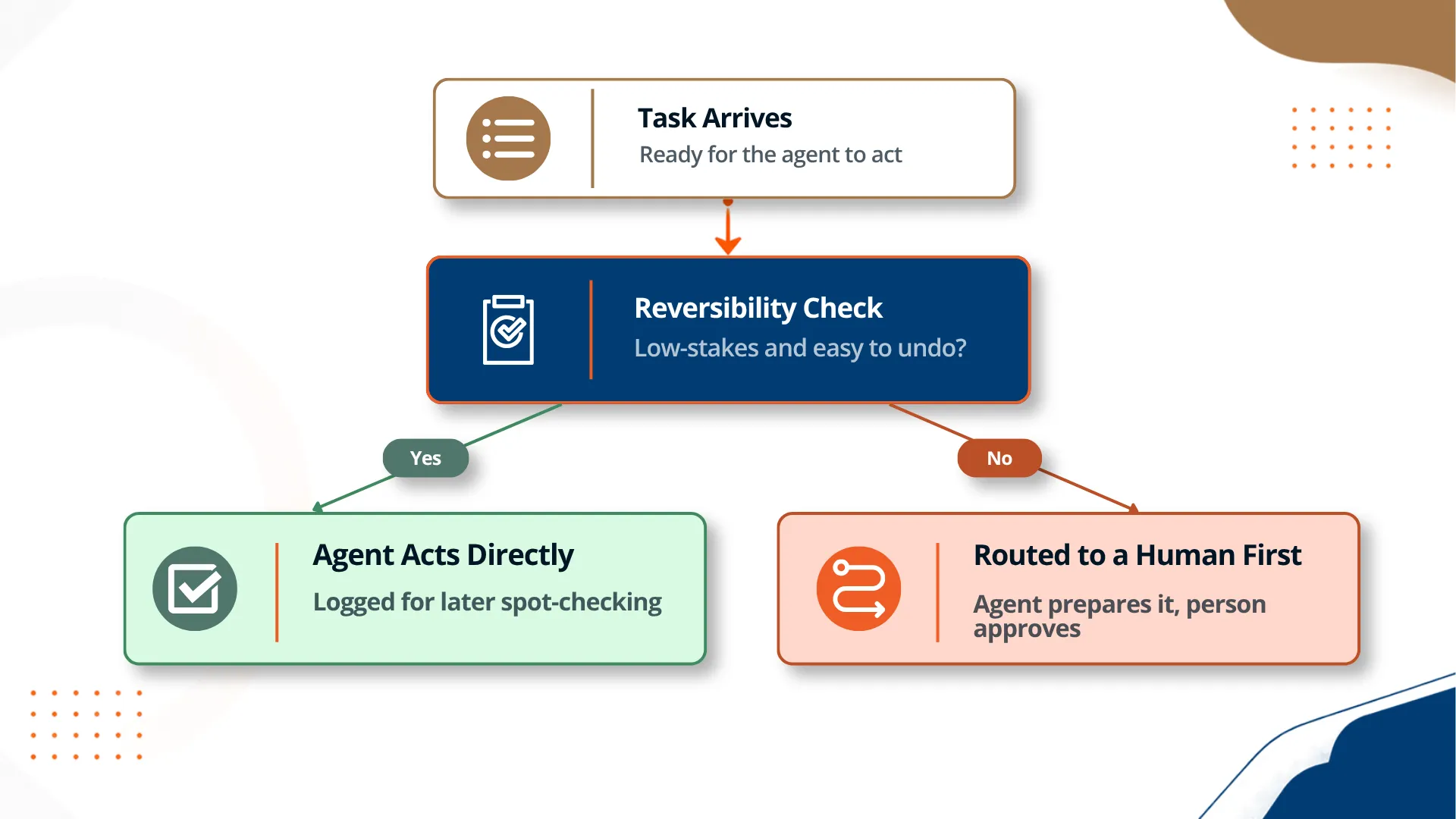
The detail teams miss most often when deciding what to automate first: the right question is not "is this task simple?" but "how costly is it if the agent gets this one wrong?" A task can look simple and still be a bad first candidate for full automation if a mistake is expensive or hard to undo, such as a final price quote or an email to a sensitive account. A task can look more complex and still be a safe candidate if a wrong output is cheap to catch and fix before it matters, such as a draft reply that a person reviews before sending. Sorting the seven agent categories by reversibility, not by how technically difficult each one is to build, is what actually determines a sensible rollout order.
Manual Workflow vs. Agent-Assisted Workflow
| Dimension | Manual Workflow | Agent-Assisted Workflow |
|---|---|---|
| Response time on routine requests | Hours, depending on who is available | Seconds to minutes, around the clock |
| Consistency | Varies by person, day, and workload | Same process every time, logged for review |
| Where mistakes tend to happen | Fatigue, distraction, forgotten follow-ups | Edge cases outside the agent's defined scope |
| Scaling to more volume | Requires hiring or overtime | Requires monitoring, not headcount |
| Best fit | Judgment calls, exceptions, relationship work | Repetitive, well-defined, high-volume tasks |
What's Working Well
Narrow agents outperform ambitious ones. An agent built to do one job well, such as booking an appointment or answering from a fixed document set, is far more dependable in production than a general assistant asked to handle anything.
Built-in verification builds real trust. A booking agent that confirms identity before locking a slot, or a knowledge agent that cites its source, gives people a way to check the output instead of just hoping it is correct.
Human-agent teams are outperforming either alone. Microsoft's 2025 Work Trend Index found that employees at organizations furthest along in combining human judgment with AI agents were far more likely to describe their company as thriving than the average organization surveyed, a gap the report ties directly to how those teams are structured.
Honest Trade-offs
Not every agent project makes it to production. Gartner has projected that by 2028 a third of enterprise software will include agentic AI, while cautioning in the same research that a large share of current agent projects will be scrapped first, usually due to unclear value or weak governance rather than the technology itself.
Integration is usually the hard part, not the AI. Connecting an agent to the real calendars, ticketing systems, or document stores a business already uses typically takes longer than building the agent's core logic.
Agents drift if nobody watches them. A model that performed well at launch can degrade as the underlying documents, policies, or customer patterns change, which means someone still needs to own ongoing monitoring, not just the initial build.
Surprising Decisions Worth Noting
The best agents are allowed to say no. An agent that can refuse to act and flag a case for a human, instead of guessing, is consistently more trusted by the people using it than one that always produces an answer.
A few extra seconds of friction increases adoption. Verification steps, such as confirming a customer's identity before finalizing a booking, feel like they would slow things down, but teams often find they increase confidence in the system enough to offset the extra time.
Most teams start with the wrong agent first. The instinct is to automate the most visible or annoying task, which is not always the safest or highest-value place to start; a reversibility review before rollout usually changes the order.
The End Result
None of these seven agents are science fiction, and none of them replace a role on their own. Each one removes a specific, repetitive task, inbox triage, scheduling, note-taking, document search, booking, reporting, or first-line support, so the people doing that work spend less time on the mechanical parts of the job and more time on the parts that actually need a human. The organizations getting real value are not the ones chasing one all-purpose assistant; they are the ones matching a narrow, well-instrumented agent to a specific bottleneck, one workflow at a time. DotStark's AI agent development team builds exactly this kind of narrow, production-ready agent, rather than a single general assistant asked to do everything at once.
Frequently Asked Questions
What is the actual difference between an AI agent and a chatbot?
A chatbot answers questions and holds a conversation. An AI agent takes that a step further and actually does something: it can check a calendar and book the meeting, look up a policy and cite the source, or verify a customer's details and confirm a booking, without a person carrying out each step by hand. The practical test is simple: if removing the tool would leave a task undone rather than just unanswered, you are looking at an agent, not a chatbot.
Which daily tasks are safest to hand to an AI agent first?
Start with tasks that are repetitive, well defined, and easy to reverse if something goes wrong, such as sorting incoming email, finding a meeting time across calendars, or answering questions from an internal knowledge base with a cited source. Avoid starting with tasks that are one-off, ambiguous, or hard to undo, such as final pricing decisions or sensitive customer communications, until the agent has a track record on the simpler work.
How reliable are AI agents right now?
Reliability depends heavily on how narrow and well-instrumented the agent is. A tightly scoped agent built for one workflow, such as booking appointments or answering questions from a fixed set of documents, tends to be dependable because its inputs and outputs are predictable. A broad, general-purpose agent asked to handle many different kinds of decisions is far less predictable, which is one reason Gartner has warned that a large share of current agentic AI projects will be scrapped before they reach production.
Will AI agents replace jobs, or just individual tasks?
In most organizations today, AI agents are replacing specific tasks within a role, not entire jobs. An agent that triages email or drafts a meeting summary removes a recurring chore, but the judgment calls, exceptions, and relationship-based parts of most roles still need a person. Microsoft's own research into AI-forward companies describes this as workers becoming managers of a small team of agents rather than being replaced by them, though the mix of tasks within a role can shift substantially over time.
What happens when an AI agent gets something wrong?
A well-designed agent is built with limits on what it can do without a human check, so a mistake in a low-stakes, easily reversible task, such as a draft email, simply gets corrected before it goes out. The bigger risk comes from agents given authority over higher-stakes or hard-to-reverse actions without a review step, which is why most production deployments route anything ambiguous, high-value, or irreversible to a person before it is finalized rather than after.


_1.png)