

_1.png)
Walk into any product planning meeting in 2026 and you'll hear “AI agent,” “GPT tool,” and “RPA bot” used almost interchangeably as if they're just different brand names for “automated stuff.” They're not. Each term describes a fundamentally different approach to automating work, with different strengths, costs, and failure modes.
The confusion is understandable. All three promise to take manual work off someone's plate. All three can be wired into business software. And in the last two years, the lines have blurred further as vendors slap “AI-powered” on legacy RPA tools and “agentic” on what is really just a chatbot with a plugin. But choosing the wrong category for a task leads to predictable pain: RPA bots that break the moment a UI changes, GPT tools that hallucinate when asked to make binding decisions, or “agents” that are expensive, unpredictable overkill for a task a simple script could handle in milliseconds.
This post untangles the three, shows where they overlap, and gives you a practical framework for picking the right one.
RPA: Robotic Process Automation
RPA automates repetitive, rule-based tasks by mimicking the exact clicks, keystrokes, and data entry a human would perform usually across structured data and predictable user interfaces.
Key characteristics:
- Deterministic: follows explicit, pre-programmed rules (“if field A contains X, copy it to field B”)
- UI or API-driven: interacts with screens, forms, spreadsheets, and legacy systems the way a human operator would
- No real reasoning: it doesn't “understand” the data, it pattern-matches and executes
- Best on structured input: fixed-format PDFs, tables, forms, databases
RPA tools (UiPath, Automation Anywhere, Power Automate) shine in back-office environments where the process itself rarely changes payroll runs, data migration between two systems, reconciling spreadsheets. The tradeoff is brittleness: a moved button, a renamed column, or an unexpected data format can break the whole workflow until a developer fixes the script.
GPT Tools: LLM-Powered Tools, Plugins, and Copilots
GPT tools (a shorthand for any single large language model interaction, whether that's a chat interface, a plugin, or a copilot embedded in software) use a language model to generate, summarize, translate, or answer questions typically in a single pass, or with limited, explicitly-defined tool calls within one exchange.
Key characteristics:
- Language-native: understands and generates unstructured text, code, and (increasingly) images
- Single-shot or lightly augmented: you give it a prompt, it gives you an output; it might call a search tool or a calculator, but it doesn't independently plan a multi-step project
- No persistent memory by default: each request is generally stateless unless the surrounding application explicitly feeds in context
- Judgment, not certainty: it reasons probabilistically over language, so outputs are fluent but not guaranteed correct
Examples include a GitHub Copilot-style code suggestion, an LLM summarizing a meeting transcript, or a chatbot answering “what's our refund policy?” GPT tools are extremely good at working with unstructured data emails, contracts, transcripts, free-text tickets the exact place RPA struggles.
AI Agents: Autonomous, Goal-Driven Systems
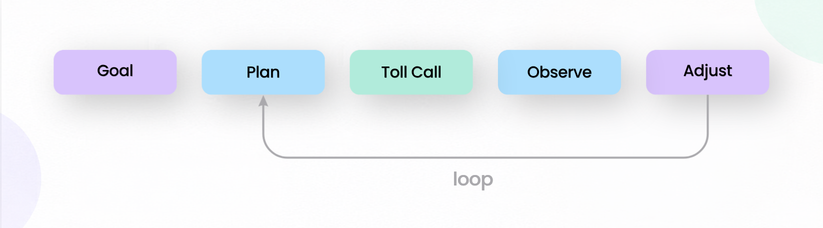
AI agents take the reasoning ability of an LLM and wrap it in a loop: given a goal, the agent plans a sequence of steps, chooses and calls tools (APIs, RPA bots, databases, other models), observes the results, and adjusts its plan often across many turns, sometimes over minutes or hours, with memory of what it has already tried.
Key characteristics:
- Goal-driven, not instruction-driven: you specify an outcome, not a fixed script
- Multi-step planning and reasoning: breaks a goal into sub-tasks and sequences them
- Tool use: can call APIs, search the web, run code, query databases, or trigger RPA bots as part of its own workflow
- Memory and state: retains context across steps (and sometimes across sessions) to inform later decisions
- Self-correction: can detect a failed step and try an alternative approach
An agent handling “resolve this customer's billing dispute” might pull the account history, check a refund policy document, calculate the adjustment, issue the refund via an API, and draft a confirmation email all without a human specifying each individual step. This is the core distinction from GPT tools: an agent decides what to do next, not just what to say.
Comparison Table
| Dimension | RPA | GPT Tools | AI Agents |
|---|---|---|---|
| Autonomy level | None follows fixed scripted rules | Low responds per request, no self-directed planning | High plans and executes multi-step goals independently |
| Decision-making | Rule-based branching only | Generates judgment-based text/output per prompt | Makes sequential decisions, adapts plan based on outcomes |
| Unstructured data | Poor needs structured input/UI | Strong native strength | Strong inherits LLM's language understanding |
| Adaptability to change | Low breaks on UI/format changes | Moderate robust to phrasing, not to task scope | High can replan when a step fails or context shifts |
| Error handling | Fails hard, needs manual fix | May hallucinate; no self-correction loop | Can detect failures and retry/adjust approach |
| Setup complexity | Moderate process mapping, script build | Low prompt engineering, integration | High orchestration, tool access, guardrails, testing |
| Typical use cases | Invoice processing, data entry, legacy system syncing | Content drafting, summarization, code suggestions, Q&A | Autonomous customer support, multi-step research, workflow orchestration |
Real-World Examples
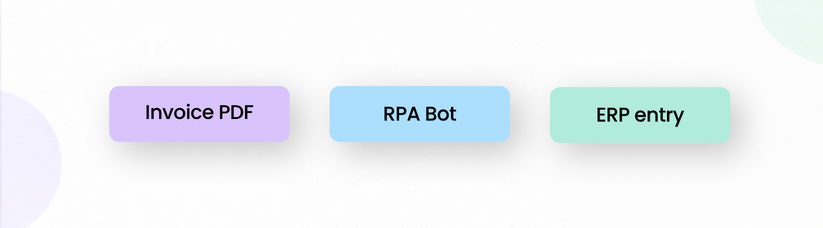
- RPA: A finance team automates invoice processing — extracting line items from a fixed-template PDF, matching them against purchase orders, and posting entries to an ERP system, all without human intervention as long as the invoice format doesn't change.
- GPT Tools: A marketing team uses an LLM to draft product descriptions from a spec sheet, or a support team uses a copilot to summarize long ticket threads before a human responds.
- AI Agents: A support agent autonomously handles a customer's “where's my order” question by checking the shipping API, detecting a delay, issuing a discount code per policy, and closing the ticket or a research agent given “compare our top 5 competitors' pricing” that searches the web, compiles findings, and produces a structured report without step-by-step instructions.
When to Use Which: A Decision Framework
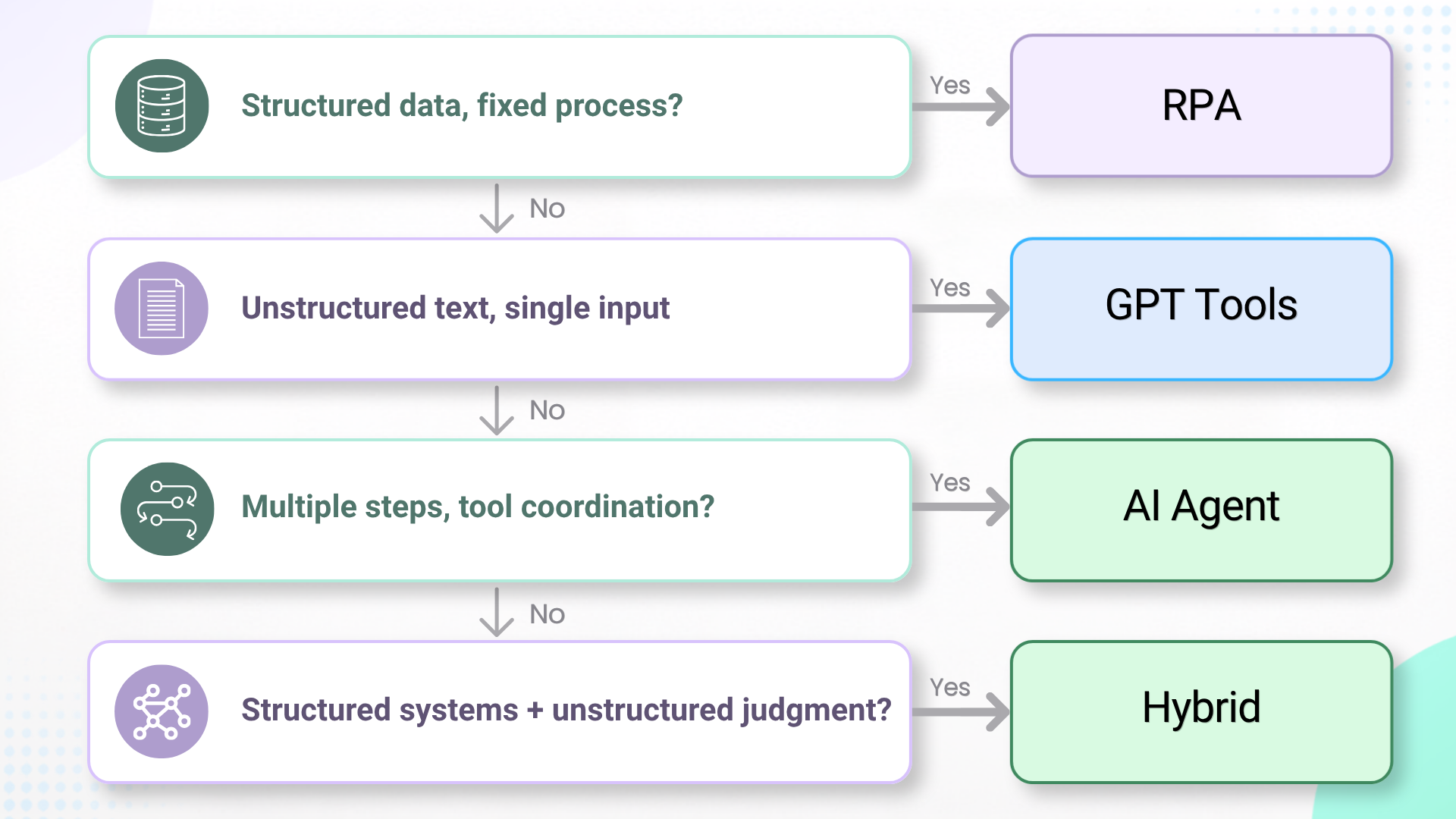
Ask these questions in order:
1. Is the data structured and the process fixed? → Yes: RPA is usually the cheapest, most reliable option. Don't reach for an LLM to do what a deterministic script can do more predictably.
2. Does the task involve unstructured text/language, but only needs a single input → output transformation? → Yes: GPT tools. Drafting, summarizing, classifying, and answering fit here — no need for multi-step autonomy.
3. Does the task require multiple steps, tool coordination, and decisions that depend on intermediate results? → Yes: AI agent. This is warranted when the number and order of steps can't be fully known in advance.
4. Does the task span structured systems and unstructured judgment? → Consider a hybrid: an agent that orchestrates RPA bots and LLM calls together (see below).
A rough rule of thumb: start with the simplest tool that solves the problem. Agents are powerful but harder to test, monitor, and predict — reserve them for tasks that genuinely need adaptive, multi-step reasoning.
Overlap and Hybrid Systems
In production, these three are increasingly layered rather than chosen exclusively:
- Agents calling RPA bots as tools: An agent decides that an invoice needs processing and when, then triggers an existing RPA bot to actually execute the structured extraction and data entry combining the agent's flexible reasoning with RPA's reliable execution on structured tasks.
- RPA triggering GPT tools: A traditional RPA workflow hits an unstructured document (a customer email, a scanned contract) and calls an LLM to extract or summarize before resuming its rule-based path.
- Agentic orchestration layers: Modern automation stacks increasingly use an agent as the “brain” that routes work sending structured tasks to RPA, language tasks to GPT tools, and only handling the ambiguous, multi-step coordination itself.
This layering is why the “vs” in comparisons like this one can be misleading in practice, these systems are complementary building blocks rather than mutually exclusive choices.
Conclusion
RPA, GPT tools, and AI agents aren't competing technologies they sit on a spectrum from rule-based execution to language generation to autonomous, goal-driven reasoning. RPA excels at structured, repetitive, unchanging processes. GPT tools excel at understanding and generating unstructured language in a single pass. AI agents excel at coordinating multiple steps and tools toward a broader goal, adapting as they go. The best automation strategy usually isn't picking one it's matching each part of a workflow to the tool built for that kind of work, and increasingly, stitching them together.
FAQ
Q: Can an AI agent replace RPA entirely?
Not usually, and often not sensibly. RPA remains more reliable and cheaper for purely structured, unchanging tasks. Agents are better used to orchestrate when and how RPA bots run, not to replace deterministic execution with probabilistic reasoning.
Q: Are GPT tools the same as AI agents?
No. A GPT tool responds to a single prompt (possibly with a tool call or two); an agent independently plans and executes a sequence of steps toward a goal, adjusting as it goes and retaining memory across those steps.
Q: Which is cheapest to implement?
Generally RPA and GPT tools are cheaper and faster to deploy for well-defined tasks. AI agents require more upfront investment in orchestration, guardrails, and testing, but can handle a broader, more variable range of tasks once built.
Q: How do I know if my task needs an agent instead of a simpler tool?
If the number and order of steps needed to complete the task can't be fully specified in advance because they depend on what happens at each step you likely need an agent. If the steps are fixed and predictable, a GPT tool or RPA script will be simpler and more reliable.
.png "cta-(2).png")

.png)